Descript Review: Best Use Cases for Video & Podcast Editing
Descript is a text-based AI video and audio editor designed for dialogue-driven content creators. It generates a transcript from your media, then lets you edit by editing the text. Standout features include Studio Sound for audio cleanup, automatic captions, voice cloning, multi-track editing, and AI tools like filler word removal. Plans range from a free tier to Business at $50 monthly, with Hobbyist at $16 and Creator at $24. Best suited for podcasters, YouTubers, educators, and remote teams producing dialogue-heavy content.
Content creation is often considered a dream job, but once the cameras stop, the real work begins. Editing is time-consuming and often labor-intensive, so it’s no surprise that many creators search for ways to simplify the process. For dialogue-driven content, the Descript AI video editor promises to change the game. It uses AI-powered technology to edit media through a text transcript. But does this video editor really live up to its claims, and is it worth the money? We answer these questions and more in this comprehensive Descript review.
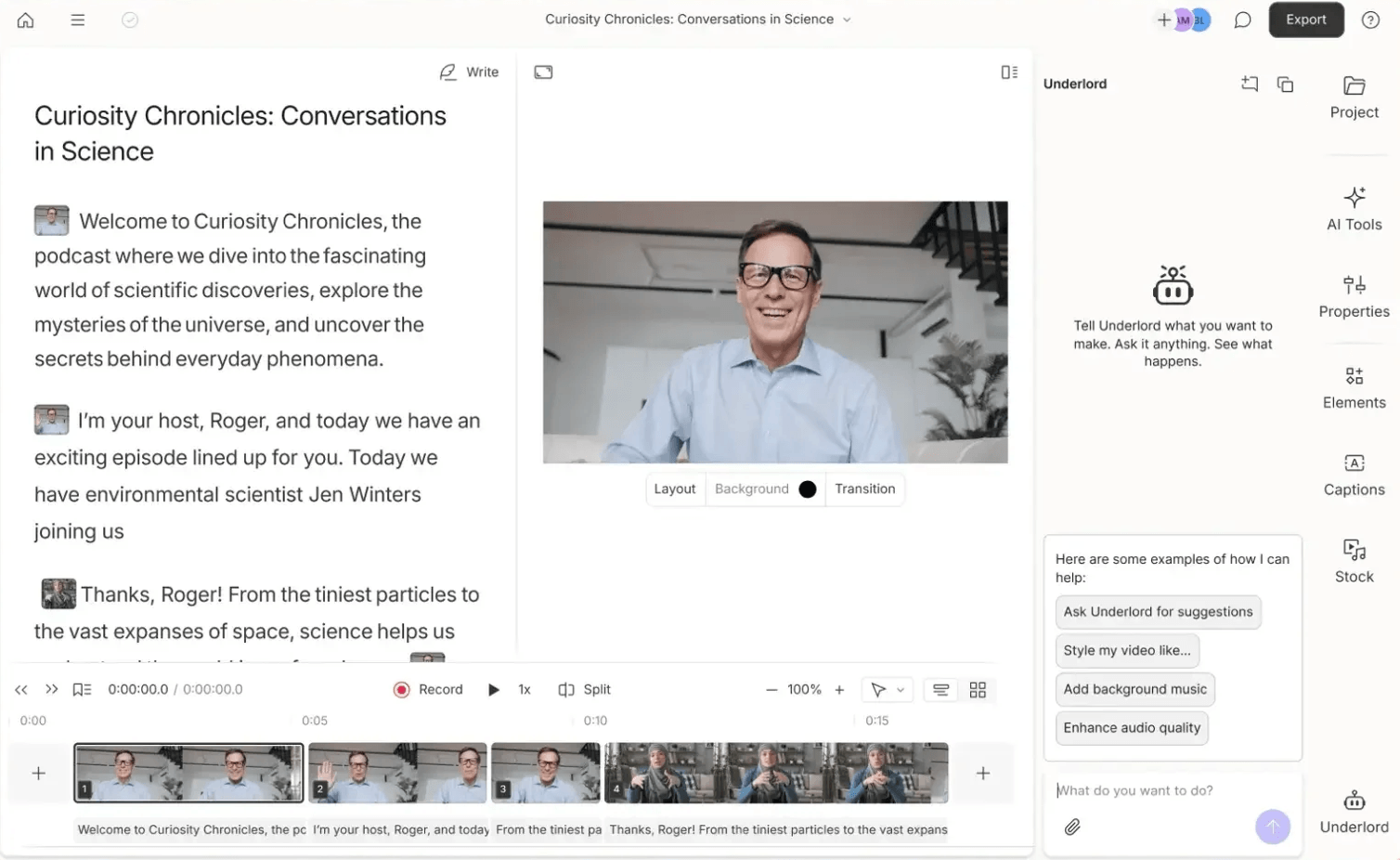
Table of Contents
What is Descript?
Descript is an audio and video editing software that uses AI to edit videos from a text transcript. The editor claims to have a wide range of uses, including voice cloning, adding subtitles, removing filler words, and transcription. Its ability to streamline the entire production process, from recording to publishing, has made it a popular choice for podcast editing software.
Pricing - How Much Does Descript Cost?
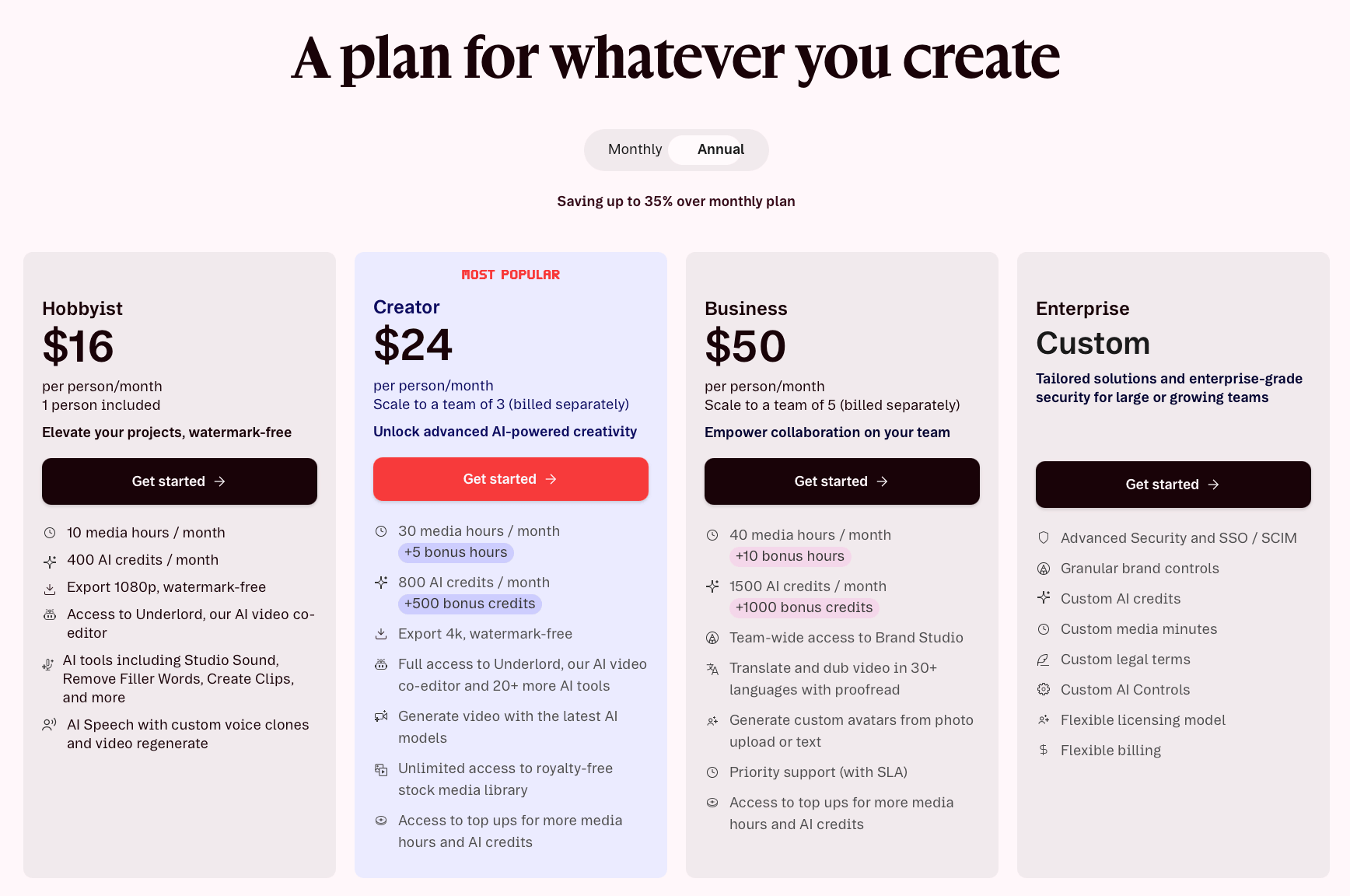
Descript has a range of paid tiers with different features for beginner to advanced creators.
Hobbyist - $16 per month
Hobbyist is the base tier and is available for $16 per person per month. This subscription includes:
10 media hours per month
400 AI credits per month
Export 1080p watermark-free videos
Access Underlord, Descript’s AI video co-editor
AI tools like Create Clips, Remove Filler Words, Studio Sound, and more
AI Speech with video regeneration and custom voice clones
Creator - $24 per month
Creator is Descript's second and most popular tier. It’s available for $24 per month per person and allows you to scale to a team of three. It’s important to note that when purchasing this tier for multiple people, each person is billed separately, which could be annoying for a single business. The Creator tier includes:
30 media hours per month with 5 bonus hours
800 AI credits per month with 500 bonus credits
Export 4k watermark-free videos
Full access to Underlord and 20+ more AI tools
Generate videos with Descript’s latest AI models
Unlimited access to royalty-free stock media library
Access top ups for more AI credits and media hours
Business - $50 per month
Descript’s highest regular tier subscription is Business. This option is geared toward teams and is $50 per month per person. It is scalable to a team of 5, which are all billed separately, like the Creator tier. With Business, you get:
40 media hours per month with 10 bonus hours
1500 AI credits with 1000 bonus credits
Team-wide access to Brand Studio
Translate and dub videos in over 30 languages with proofreading
Priority support
Generate custom avatars from text or photo uploads
Access to Top Ups for more AI credits and media hours
Descript also offers a custom Enterprise tier geared toward large or growing teams. With Enterprise, you get:
Advanced security and SSO/ SCIM
Granular brand controls
Custom AI credits
Custom media minutes
Custom legal terms
Custom AI controls
Flexible licensing model
Flexible billing
For creators who are just getting started on their creative journey, Descript also offers a free subscription. You won’t be able to do a lot with the free plan, but it will give you a taste of everything Descript has to offer to see if it’s the right fit for your workflow. Features include:
1 hour of transcripts per month
720p video exports with a watermark
100 AI credits (lifetime amount)
Essential editing tools
Underlord AI co-editor
5GB storage
Limited access to features like Studio Sound and filler word removal
Descript Best Features
Descript editing software has a range of features for creators to make editing dialogue-based videos easy.
Transcript-Based Editing
When you’re creating podcasts, YouTube videos, or filming interviews, editing the audio and video can be tedious. Descript saves you time by generating a text transcript from an uploaded video or audio clip, so you can edit your media by manipulating the text. Think of it like a word processor for videos. When you delete text, it removes the corresponding media segment, letting you make clips and edits easily.
You can also change the audio or video timeline by cutting and pasting the text into your desired order. This feature is great for those who aren’t “tech savvy” and struggle with traditional video editing software. It simplifies the process so you can edit a video only using the text transcript.
Studio Sound
Nothing will lower the quality of a video faster than poor audio. Unfortunately, the microphones used in podcasts and interviews often pick up unwanted noise. Descript’s Studio Sound uses generative AI to remove echo and background noise instantly. The AI isolates vocals while removing ambient noise and reverb, and regenerates the audio for you.
You can adjust the intensity of the vocals with a simple slider, and the multi-track control tool lets you adjust each track independently. Studio Sound works on both video and audio files, giving you greater sound control for higher quality videos.
Captions and Templates
Descript automatically generates captions and allows you to customize the fonts and styles. It also offers templates that make it easy to store and reuse your favorite logos, layouts, and caption styles.
Multi-Track Editing
With Descript, you can edit multiple audio or video tracks for more complex podcast productions. The software uses Sequences to contain or group the tracks together, so they stay in sync throughout the editing process. You can even edit multiple tracks at the same time with a single text transcript, and all of the tracks will adjust automatically to maintain alignment.
Features Comparison
It wouldn’t be an honest Descript review if we didn’t compare it to similar software editors. While Descript offers numerous features, it’s not the only text-editing software on the market. Let’s explore how it compares to its competitors.
Descript vs. Riverside.fm
Whereas Descript is an editing software, Riverside.fm is designed for recording and editing. With Riverside, you can locally record high-quality audio and video, so you never have to worry about internet issues. It also lets you automatically create short-form videos with Magic Clips. Riverside allows for automatic transcription, multi-track editing, and live streaming.
Riverside.fm is a great option for those looking for high-quality 4k recording, while Descript is better for text-based video and audio editing. Riverside offers five pricing options: Basic for free, Pro for $29/ month, Live for $39/ month, Webinar for $99/ month, and Business custom pricing.
Descript vs. Otter.ai
Descript’s second competitor is Otter.ai. Otter automatically records, transcribes, and summarizes meetings in real time from Microsoft Teams, Google Meet, and Zoom. Where Descript excels is in video and audio post-production; Otter is perfect for live meeting captures.
Otter doesn’t offer editing features, instead it focuses on generating AI summaries, action items, and notes, highlighting key phrases, and AI summaries. If you need real-time notetaking, choose Otter, but for editing content, Descript is the better choice. Otter.ai offers four pricing options: Basic for free, Pro for $16.99/ month, Business for $24/ month, and Enterprise.
Descript vs. DaVinci Resolve
DaVinci Resolve is a post-production software that combines professional video editing, visual effects, motion graphics, color correction, and audio post-production. DaVinci is an excellent choice for those looking for a professional-grade editor, which could be overwhelming for beginners. Where Descript is fast and user-friendly, DaVinci offers unmatched technical control covering all video and audio needs. DaVinci’s pricing depends on the software you choose and ranges from free to $295+.
Quick Glance Guide
| Features | Descript | Riverside.fm | Otter.ai | DaVinci Resolve |
|---|---|---|---|---|
| Transcript-based editing | Yes | Limited | Yes | Yes |
| Studio Sound | Yes | Yes | No | Yes |
| Captions and Templates | Yes | Yes | Yes | Yes |
| Multi-track editing | Yes | Yes | No | Yes |
| Pricing | Four pricing tiers | Five pricing tiers | Four pricing tiers | Depends on chosen software |
Who is Descript For?
Descript is a powerful tool for dialogue-based content creators, educators, and marketers. People with podcasts, YouTubers, those looking to create educational videos and tutorials, and remote teams will find the text-based editing software easy to use and capable of delivering exceptional post-production speed.
Is It Worth The Money?
Thanks to its multiple pricing tiers and numerous features, Descript editing is a great tool for creators. Overall, it offers excellent value and can help creators grow their online presence faster. If you’re unsure whether or not Descript is the right choice, the free tier subscription lets you try it out without any commitment. From creators just getting started to established businesses, Descript makes editing quality videos from text-based content quick and easy.
-
While they’re both AI-powered video editors, CapCut and Descript have different features. CapCut is great for heavy visual editing, while Descript is geared toward text-based edits.
-
Descript offers four pricing tiers: Free, Hobbyist for $16 per month, Creator for $24 per month, Business for $50 per month, and Enterprise, which provides custom pricing.
-
Descript is considered one of the most user-friendly and versatile text-based editing tools. It’s an excellent option for YouTubers, podcasters, educators, and businesses.

Red 11 Media is an educational platform and creative studio focused on driving growth online through strategic content creation. We help creators, brands, and businesses understand how to build sustainable audiences across YouTube, podcasting, and long-form digital content.