
Descript Review: Editing-First Podcast and Video Workflows
Descript is one of the best editing tools available for podcasters and video creators producing interview-based content, talking head videos, and screen recordings. Its text-based editing approach lets users edit audio and video by editing transcripts, dramatically reducing editing time. Standout features include automatic filler word removal, AI voice cloning through Overdub, Magic Clips for social media, and collaborative editing. Plans start at a free tier with paid options from $24 monthly. Limitations include weaker customer support and unsuitability for complex video production.
This is an honest review of Descript based on real use across podcast editing, video editing, and collaborative content production workflows.
Descript has developed a strong reputation among video creators and podcasters, and for the most part, that reputation is deserved. But like any tool, it has limitations that are worth understanding before you commit to it as a core part of your production stack.
This Descript review covers everything from the editing experience and AI features to export quality, pricing, and the areas where the platform falls short.
If you are considering Descript for editing podcasts, talking head videos, or any audio and video editing workflow, this breakdown will help you make a confident decision.

Table of Contents
What Is Descript?
Descript is an audio and video editing platform built around a text-based editing approach. Rather than working directly on a timeline like Adobe Premiere or Final Cut, you edit by working on a transcript of your recording.
Delete words from the text, and they are removed from the audio and video. Rearrange sentences, and the media follows. It is a fundamentally different way of thinking about the editing process, and for the right type of content, it is genuinely transformative.
Descript started as a transcription tool and has grown into a full audio and video editing platform with AI features, collaborative editing, screen recording, and podcast and video distribution integrations.
It is primarily aimed at podcasters, video creators producing talking head videos, and teams working on content creation workflows where speed and accessibility matter more than frame-level precision.
It is not a replacement for a professional video editor working in Final Cut or Adobe Premiere on complex multi-camera productions. It is, however, one of the best tools available for podcast episodes, interview-based video content, and any workflow where the majority of editing decisions are about what is said rather than how it looks.
Text-Based Editing: The Core Feature
Text-based editing is the feature that makes Descript worth considering in the first place, and after testing it across multiple projects, it remains the most impressive and practical thing the platform does.
When you import or record audio and video in Descript, it automatically transcribes the content and displays the transcript alongside the media. From that point, editing is done primarily by editing the text.
You simply highlight a section, delete it, and the corresponding audio and video are removed from the timeline. Word gaps, awkward pauses, and entire sections can be cut in just a few clicks without touching a waveform.
For podcast editing and talking head video content, this approach is a game-changer. Anyone who can edit a Google Docs document can navigate the core editing workflow in Descript without prior experience in audio or video editing software.
That accessibility matters enormously for small teams where editing responsibilities need to be shared across people with different skill levels.
The transcription accuracy is consistently good. Descript does a surprisingly good job of handling multiple speakers, different accents, and conversations with technical vocabulary. Errors do occur, particularly with proper nouns and industry-specific terms, but the overall accuracy is high enough that the transcript is genuinely useful for editing rather than requiring constant correction before you can use it.
The desktop app runs smoothly on both Mac and Windows, and the intuitive interface keeps the editing process moving without constant menu diving. For video editors coming from Adobe Premiere or Final Cut, who are used to timeline-first workflows, the transition to a text-first approach can be steep. For everyone else, it clicks quickly.
Filler Word Removal
Filler word removal is one of the most practically valuable features in Descript, and it is one of the things the platform does better than any competing editing tool.
Descript automatically identifies every instance of filler words across all speakers in a recording. Ums, uhs, you knows, likes, and similar speech patterns are flagged throughout the transcript and can be reviewed and removed in bulk across the entire project.
For a forty-five-minute podcast episode with two guests, being able to remove filler words in just a few minutes rather than hunting for them manually across the audio file saves a significant amount of editing time.
The results are clean. Descript handles the word gaps left by removed filler words well, trimming the silence naturally so the conversation flows without obvious jump cuts. It does not always get this perfect, and on faster-paced conversations, you may want to review individual removals rather than accepting all of them at once.
But for the vast majority of podcast episodes and interview-based video content, the automated filler words removal produces a tighter, more professional result with minimal manual intervention.
This feature alone makes Descript worth serious consideration for any podcaster or video creator who spends significant time in the editing process, cleaning up conversational speech. The time saving is real and consistent across projects.
AI VoIce Cloning and Overdub
AI voice cloning is one of Descript's most distinctive features and one that separates it from every other editing tool in its category. Overdub allows you to create a synthetic version of your own voice and use it to re-record individual words and phrases in a finished recording without going back to the microphone.
In practice, this means that if you stumble over a word, mispronounce a name, or want to correct a factual error after recording, you can type the correction and Descript will generate a voice recording of that correction in your own voice and drop it into the audio file at the right point.
The join is not always invisible, particularly on longer replacements or where the surrounding audio has a distinct room tone. But for fixing short mistakes and word-level corrections, the results are genuinely impressive for a feature that requires no studio time and takes just a few minutes to apply.
Descript also offers stock AI voices for narration and text-to-speech applications, which is useful for video creators producing content that requires a consistent voiceover across multiple projects without recording every line.
These stock AI voices are good but not indistinguishable from a real voice recording, and for professional production work, they are best used as a placeholder or for secondary narration rather than primary content.
Voice cloning requires training time and works better the more voice recording material it has to learn from. Setting up your own voice model is straightforward, and the desktop app guides you through the process clearly.

Audio and Video Editing Quality
Audio Quality
Descript's audio quality is solid for podcast editing and interview-based content. It handles professional audio well, and its background noise removal does a good job of cleaning up recordings that were captured in less-than-ideal environments. The actual audio file quality is preserved through the editing process, and exports maintain the fidelity of the source material without unnecessary compression.
Studio sound is achievable within Descript for most podcast and video use cases. The platform applies audio enhancement automatically when enabled, and the results are consistently clean. For professional audio that needs more detailed processing, Descript integrates with external audio editors and allows you to export the actual audio file for processing in a dedicated audio editor before reimporting.
Video Quality
Video quality in Descript is where the platform shows its limitations most visibly compared to a professional video editor like Adobe Premiere or Final Cut. The editing experience for talking head videos and podcast video content is excellent, but for projects requiring color grading, visual effects, complex transitions, or multi-camera editing, Descript is not the right tool.
Export quality is good at the standard settings. The final video output is clean and well-suited for YouTube, social media, and podcast video distribution.
Descript uses proxy files during the editing process to keep the interface responsive, which can make footage look lower resolution while you are working on it. The final video export uses the original media files and the quality difference is immediately apparent.
For video creators producing talking head videos, interview content, and screen-recording-based tutorials, Descript covers everything needed without requiring a separate editing platform. For narrative video, documentary work, or anything that requires frame-level precision and advanced visual editing, you will still need a professional video editor alongside it.
AI Tools and Descript Features
Beyond text-based editing and filler word removal, Descript has invested heavily in AI features that cover a wide range of content creation tasks. Here is how the key ones perform in practice.
Magic Clips
Magic Clips uses AI to automatically identify the most shareable moments from a longer recording and generate formatted clips for social media. For video creators producing long-form podcast episodes or interviews, this is one of the most time-saving features in the platform. Rather than watching back an entire episode to find good clip moments, Magic Clips surfaces the best options in just a few minutes and formats them correctly for different aspect ratios.
The quality of the clips it selects is not always perfect, and you will want to review the suggestions rather than accepting all of them automatically. But the accuracy is good enough that Magic Clips consistently surfaces at least two or three genuinely usable social media clips from every recording, which would otherwise require manual review of the entire audio and video file.
Automatic Captions
Descript generates automatic captions from the transcript and allows you to add captions directly to the final video without a separate captioning tool. The accuracy mirrors the transcription quality, which is consistently good. For video editors producing content for social media where captions significantly increase watch time, having this built into the editing platform removes one more step from the post-production workflow.
Eye Contact Correction and AI-Powered Video
Descript includes an eye contact correction feature that uses AI to adjust the appearance of where a speaker is looking in a talking head video, making it appear as though they are looking directly into the camera, even when they are looking at their screen. For video creators recording themselves reading from notes or looking at a second monitor, this is a genuinely useful feature that improves the visual quality of the final video without any additional effort during recording.
Collaborative Editing
Collaborative editing is one of Descript's stronger team features and one that makes it genuinely well-suited to small content teams where multiple people work on the same projects.
Multiple team members can access and edit the same project simultaneously, leave comments on specific moments in the transcript, and review each other's changes without managing file versions manually.
The collaborative experience works similarly to Google Docs in the sense that changes are reflected in real time and the project history is maintained. For teams where a producer, editor, and host all need to work on the same episode at different stages of the editing process, this removes a significant amount of back-and-forth and keeps everyone working from the same version of the project.
Collaborative editing access is available on the creator plan and above. The free plan does not include team features, which is worth keeping in mind if collaborative workflows are a priority from the start.
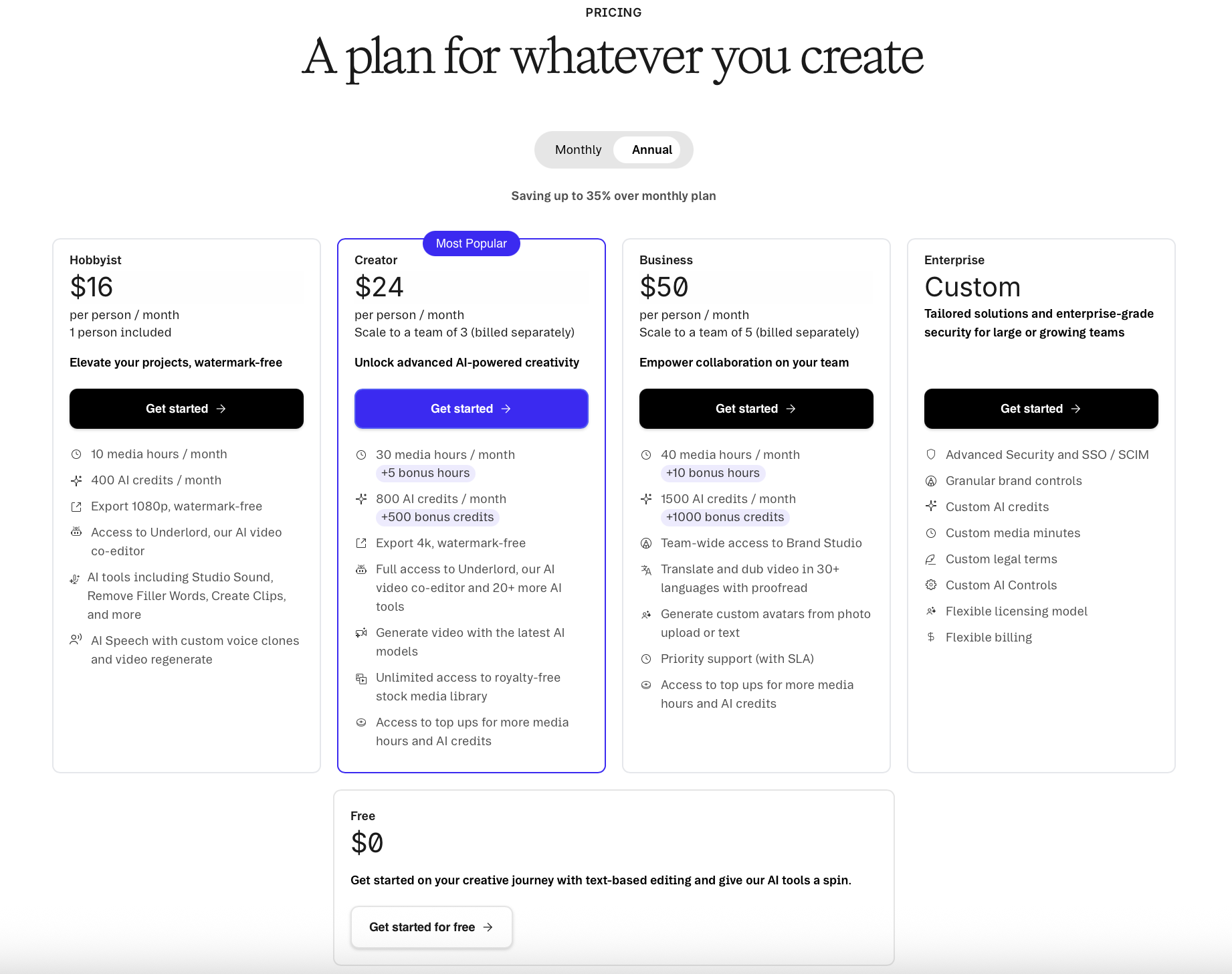
Pricing: Free Plan, Creator Plan, and Pro Plan
Descript's pricing is structured around the volume of transcription hours and the level of AI features and team access you need.
The free plan gives you access to the core text-based editing experience with a limited number of transcription hours per month. Basic features including filler word removal, automatic captions, and the desktop app are available on the free plan, which makes it genuinely useful for evaluating the platform before committing to a subscription. For light users producing one or two podcast episodes per month, the free plan may be sufficient on its own.
The creator plan sits at around $24 per month, billed annually, and expands transcription hours significantly, unlocks advanced features including voice cloning, Magic Clips, and higher export quality, and adds collaborative editing access. For most individual podcasters and video creators, the creator plan covers everything they need without paying for features that only become relevant at the team level.
The pro plan sits at around $50 per month and adds further transcription hours, priority customer support, and additional team features. For agencies or content teams producing a high volume of audio and video content across multiple clients or channels, the pro plan provides the headroom and collaboration tools to run that volume through a single platform.
Overall, the pricing is fair relative to what the platform delivers. The creator plan in particular represents strong value given the editing time it saves across filler word removal, automatic captions, and AI clip generation alone.
What Descript Does Not Do Well
No honest review of Descript is complete without addressing the areas where the platform falls short. There are a few things worth knowing about before you commit.
Steep Learning Curve for Video Editors
For experienced video editors coming from Adobe Premiere or Final Cut, the steep learning curve of adjusting to text-based editing can be genuinely frustrating. The instinct to work on the timeline is hard to override, and some of the more nuanced editing features are not immediately obvious from the interface. Expect to spend a few sessions getting comfortable before the workflow feels natural. New users without prior editing experience often find this less of an issue because they are not unlearning existing habits.
Customer Support
Poor customer service is a recurring theme in user feedback about Descript, and it is consistent enough to be worth flagging in this review. Response times can be slow, particularly on lower-tier plans, and some technical issues require more back-and-forth than they should to resolve. The documentation and community resources are generally helpful for common questions, but if you run into a more obscure problem, resolution can take longer than you would hope. This is not a dealbreaker, but it is a genuine limitation compared to platforms that prioritize support more heavily.
Not Suited for Complex Video Production
Descript is an editing tool built for content that is primarily driven by what is said rather than how it looks. Talking head videos, podcast episodes, screen recording tutorials, and interview content all sit squarely in its strength zone. Complex narrative video, multi-camera productions, color-graded documentary content, and anything requiring advanced visual effects or precise timeline editing sit outside of what Descript was designed for. Attempting to use it as a replacement for a professional video editor on that type of work will lead to frustration.
Grow Faster. Create Smarter.
Red 11 Media is an educational platform and creative studio focused on driving growth online through strategic content creation. We help creators, brands, and businesses understand how to build sustainable audiences across YouTube, podcasting, and long-form digital content.
Final Verdict: Is Descript Worth It?
This Descript review lands firmly on the side of yes, with the right expectations. For podcasters and video creators producing interview-based content, talking head videos, and any workflow where the editing process is primarily about what people say rather than how the footage looks, Descript is one of the best tools available.
Text-based editing genuinely makes editing faster and more accessible. Filler word removal works well and saves meaningful time on every episode. AI voice cloning is impressive for fixing mistakes without re-recording. Magic Clips removes one of the most tedious parts of social media content creation. Collaborative editing makes team workflows significantly smoother. The free plan is generous enough to evaluate all of this before spending a penny.
The limitations are real, too. Customer support needs improvement. The steep learning curve for experienced video editors is a genuine friction point. And for anything beyond podcast and talking head video production, you will still need a professional video editor alongside it.
Start with the free plan, run a real project through it, and see how much time the editing process takes compared to what you are used to. For most podcasters and video creators, the answer will make the decision easy.
Frequently Asked Questions
-
Descript is one of the best tools available for podcast editing, particularly for interview-based shows and conversational content. Its text based editing approach lets you cut, rearrange, and clean up episodes by editing a transcript rather than a waveform, which is significantly faster for most podcasters. Features like bulk filler word removal, automatic transcription, voice cloning, and show notes generation make it a strong all-in-one editing platform for podcasters who want to spend less time in post production.
-
Descript is excellent for talking head videos, interview-based video content, and screen recording tutorials where the majority of editing decisions are about what is said rather than how the footage looks. For complex video production requiring colour grading, multi-camera editing, visual effects, or frame-level precision, Descript is not a replacement for a professional video editor like Adobe Premiere or Final Cut. It works best as a primary editing tool for content-driven video and as a complement to more advanced software for complex productions.
-
Descript automatically identifies every instance of filler words across all speakers in a recording and displays them throughout the transcript. You can review each one individually or remove filler words in bulk across the entire project with just a few clicks. The platform then trims the word gaps left by removed filler words naturally so the conversation flows without obvious jump cuts. The accuracy is consistently good and the time saving on a long podcast episode is significant compared to hunting for filler words manually in a traditional audio editor.
-
Descript's voice cloning feature, called Overdub, lets you create a synthetic version of your own voice and use it to re record individual words and phrases in a finished recording without going back to the microphone. You type the correction, Descript generates the audio in your own voice, and drops it into the audio file at the right point. It works well for short word-level fixes and factual corrections. Longer replacements are less convincing, particularly where the surrounding room tone is distinct. For fixing small mistakes without a full re record, it is one of the most genuinely useful AI features in any editing platform currently available.
-
Descript's free plan includes access to the core text-based editing experience, a limited number of transcription hours per month, basic filler word removal, automatic captions, and the desktop app. It gives you enough access to run a real project through the platform and evaluate whether it suits your workflow before committing to a paid subscription. The creator plan unlocks voice cloning, Magic Clips, expanded transcription hours, collaborative editing, and higher export quality, and starts at around $24 per month billed annually.
-
The three most consistent limitations in this Descript review are customer support response times, the learning curve for experienced video editors adjusting to text based editing, and the ceiling on complex video production. Customer support is slower than it should be, particularly on lower tier plans. Video editors coming from Adobe Premiere or Final Cut will find the text-first workflow takes time to adjust to. And for any video production that goes beyond talking head content and interview-based editing, Descript will need to be paired with a more advanced video editing platform to cover the full scope of the work.

Red 11 Media is an educational platform and creative studio focused on driving growth online through strategic content creation. We help creators, brands, and businesses understand how to build sustainable audiences across YouTube, podcasting, and long-form digital content.
