Descript vs Riverside: Stop Using the Wrong One
Descript and Riverside look like competitors but solve different problems. Riverside excels at high-quality remote recording, livestreaming, and reliable capture even with poor internet.
Descript leads in post-production with text-based editing, AI tools, and flexible XML exports for professional workflows.
Both offer free plans and similar mid-tier pricing around $24 monthly. Choose Riverside if recording reliability matters most, or Descript if editing and collaboration are your biggest workflow bottleneck.
Descript vs Riverside is a comparison you’ll often see — and on paper, that makes sense. Both promise high-quality audio and video. Both lean heavily into AI. Both claim to simplify content creation for modern creators.
But treating them as interchangeable is how people end up frustrated, overpaying, or rebuilding their workflow six months later.
Descript and Riverside weren’t built to solve the same problem. They’ve grown toward each other over time, but their foundations still matter — and those foundations shape how they fit into your workflow, where they excel, and where they fall short.
If you’re trying to decide between them, this isn’t just a feature comparison. It’s about understanding where each platform shines, where it compromises, and which friction you actually need removed.
Table of Contents
Pricing: Similar on the Surface, Different in Practice
Both Descript and Riverside provide free plans, yet the details of these plans — and the true costs of their premium tiers — highlight each platform's distinct priorities.
Descript Pricing
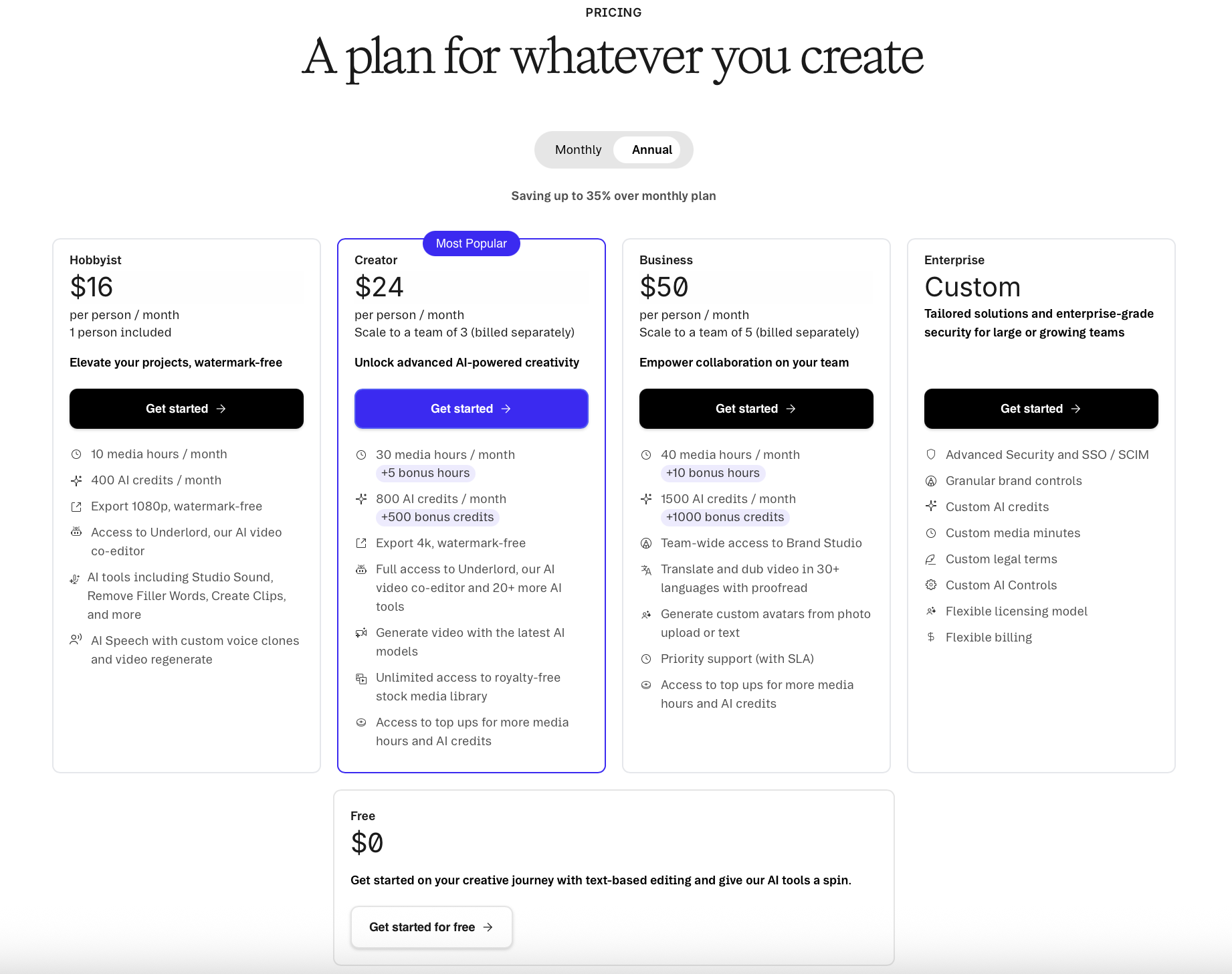
Descript’s plans range from completely free to professional team-level pricing:
Free plan (yes, actually free)
Hobbyist: ~$16/month (billed annually)
Creator: ~$24/month (billed annually)
Business: ~$50/month (billed annually)
Enterprise: Custom pricing
Descript’s pricing scales based on editing power, AI editing usage, collaboration features, and export flexibility. If you upgrade, you keep everything from previous tiers and unlock more advanced tools.
Riverside Pricing
Riverside’s pricing is structured around video recording, live production for podcast recording, and reliability:
Free plan (limited, but usable for solo recording)
Pro: ~$24/month (billed annually)
Live: ~$34/month (billed annually)
Webinar: ~$49/month (billed annually)
Business: Custom pricing
Higher tiers unlock live streaming, webinar tools, audience interaction features, and more advanced production controls.
At comparable mid-tier pricing, Descript and Riverside cost roughly the same. The difference isn’t what you pay — it’s what that money is buying you.
Descript charges for creative flexibility and post-production control. Riverside charges for capture quality, stability, and peace of mind.
Shared Features: Why They Look Like Competitors
At a glance, comparing Descript vs Riverside appears almost identical.
Both offer:
Remote recording with multiple participants
Up to 4K video recording
Screen recording
AI-generated transcripts
Clip creation
Chat-based AI assistants
Browser-based workflows
If you only skim the feature list, they look interchangeable. The reason they aren’t comes down to what each platform was originally built to do.
Riverside launched in 2020 as a remote audio-video recording platform. Recording is the core of its DNA.
Descript launched in 2017 as a transcription and audio editing tool, then expanded into full video editing over time.
They’ve converged — but they haven’t swapped strengths.

Recording Capabilities: Riverside Still Has the Edge
Riverside built its reputation on one thing: reliable remote recording. And that advantage still shows. Both platforms record locally on each participant’s device rather than relying on cloud recording like Zoom. That means higher-quality files and fewer dropouts.
Both platforms can:
Record up to 4K video
Handle up to 10 participants
Record screens
Sync files automatically after recording
But Riverside adds several recording-focused advantages that matter in real-world scenarios.
Livestreaming and Audience Interaction
Riverside allows you to livestream directly to multiple platforms at once and manage viewer comments using Omnichat. If your workflow includes live shows, panels, or audience engagement, this alone can be a deciding factor.
Descript does not position itself as a live production platform in the same way.
Bandwidth Control (This One Matters)
Both platforms offer bandwidth-saving modes:
Low Data Mode in Riverside
Bandwidth Saver in Descript
These modes let you disable live video streams during recording so participants can still capture high-quality video locally — even on bad internet.
Riverside goes further.
It allows you to pause video uploads entirely until the recording is finished, which can be critical when working with guests who have extremely poor connections. Combined with Low Data Mode, this significantly reduces the chance of dropped recordings.
For interview-heavy workflows, this is a quiet but huge advantage.
Editing Capabilities: Descript Pulls Ahead
This is where Descript starts to justify its reputation.
For creators who:
Hate traditional timelines
Work collaboratively
Edit primarily for content first, polish later
This workflow is transformative.
Interface Differences That Matter
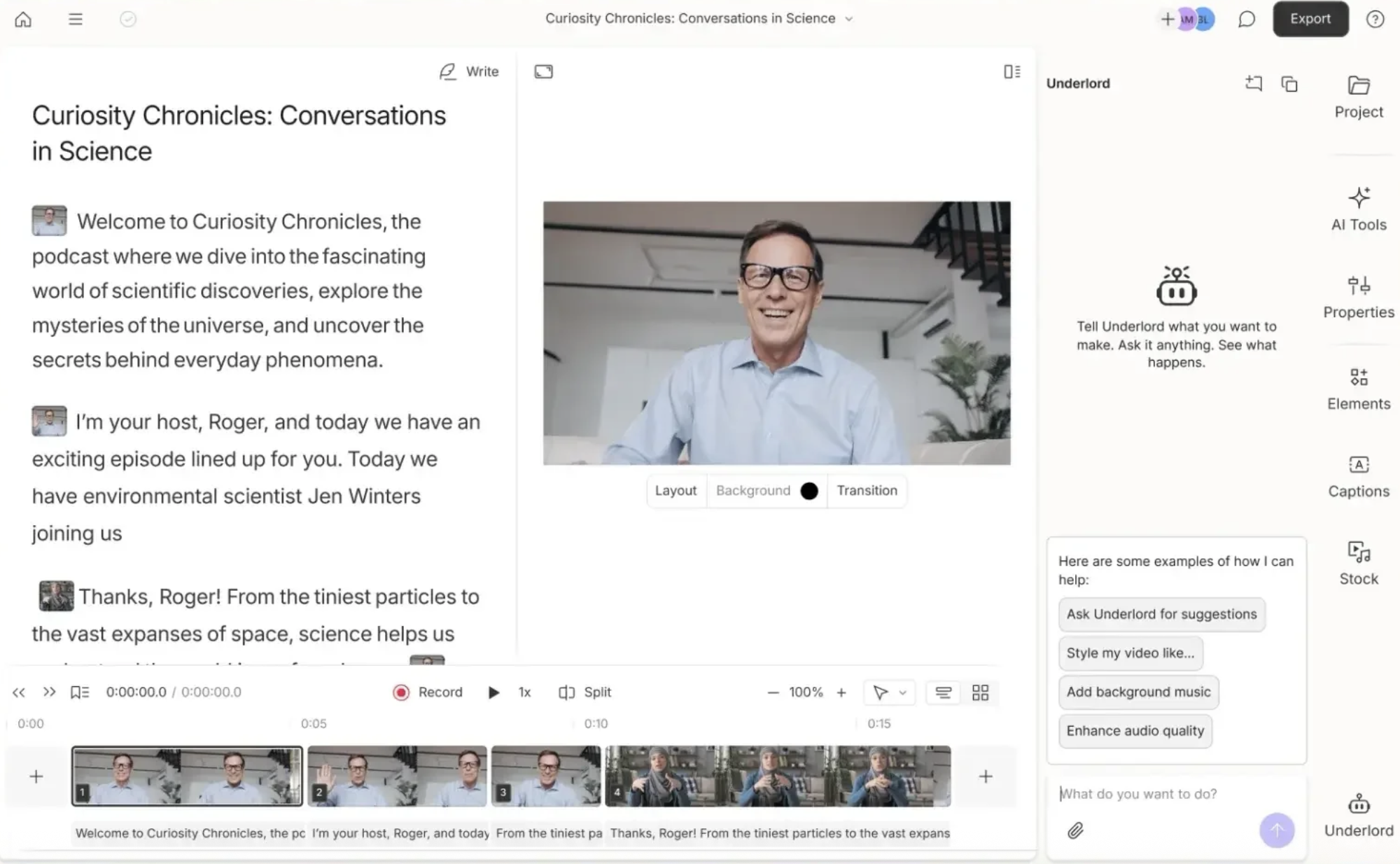
Both platforms now offer text-based editing, but the experience is slightly different.
In Descript, deleting text removes it from the transcript view. Edits are non-destructive, but finding and reversing them later takes a bit more digging unless you use the “Ignore” command (Command/Control + Delete) to preserve strikethrough text.
In Riverside, deleted text remains visible with a strikethrough by default. It’s easier to scan past edits and undo changes later without hunting.
This is a small difference — but when editing long conversations, it adds up.
Timeline Editing
Descript also edges ahead in traditional timeline editing:
Audio and video transitions
Smoother clip stitching
Sharper preview visuals in-editor
Riverside uses proxy files in the editor to maintain speed and stability, which can make footage look lower quality while editing (final exports use the high-quality files). Descript’s editor feels more visually polished during the editing process itself.
If editing is a core part of your workflow — not just trimming — Descript feels more complete.
AI Capabilities: A Near Tie
Both platforms now rely heavily on AI, and in practice, this is one of the closest comparisons.
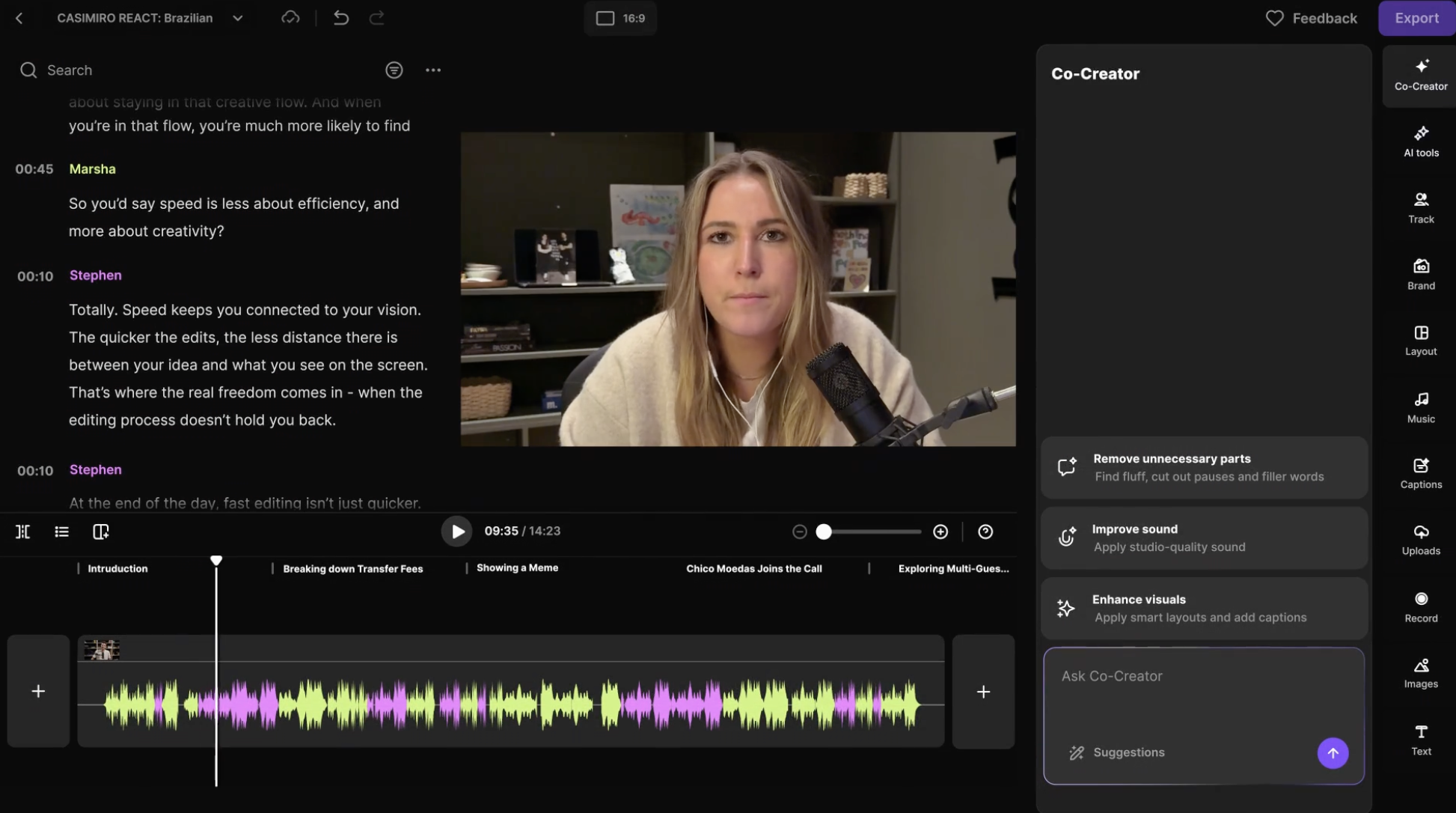
Riverside’s AI assistant: Co-Creator
Descript’s AI assistant: Underlord
Both can:
Generate summaries and show notes
Help brainstorm content
Perform edits via natural language
Answer platform-specific questions
In testing, the limitations are less about AI intelligence and more about what the platform itself allows.
Co-Creator can’t add audio transitions because Riverside doesn’t support them. Underlord can’t change default delete behavior unless you use specific commands. But both assistants are good at telling you what isn’t possible, which is surprisingly useful when learning the tools.
If you’re unsure whether either platform fits your workflow, interacting with these AI tools during a trial is one of the fastest ways to find out.
Export Quality: Closer Than You’d Expect
On paper, Descript looks like it should win here.
Riverside exports 4K video at a target bitrate of ~7 Mbps
Descript offers multiple 4K export levels:
Low: ~10 Mbps
Medium: ~20 Mbps
High: ~30 Mbps
In practice? The differences are surprisingly minimal.
Side-by-side tests using professional cameras and webcams show negligible visual differences between Riverside’s exports and Descript’s higher-bitrate exports, especially once files are uploaded to platforms like YouTube.
Where the difference is noticeable:
Descript exports faster
Descript files are ready to edit sooner
Riverside can introduce minor lip-sync issues at 4K (easily fixed using its lip-sync tool)
The Bigger Export Issue
The most meaningful difference isn’t quality, it’s flexibility.
Descript allows you to export your timeline as XML and continue editing in tools like:
Premiere Pro
DaVinci Resolve
Final Cut Pro
Pro Tools
Logic
Audition
Riverside moved this feature to its Enterprise plan.
You can still download individual tracks from Riverside, but any edits you make before exporting are baked into the files. You lose the ability to use text-based or AI edits as a non-destructive first pass in another editor.
For professional workflows, this is a real limitation.
Who Each Platform Is Actually For
Descript Is Best For:
Creators who want editing to feel easier, faster, or invisible
Teams collaborating on content edits
Social-first creators repurposing long-form content
Anyone intimidated by traditional editing software
Editors who want flexibility after export
If editing is your bottleneck, Descript removes it.
Riverside Is Best For:
Podcasters recording remote interviews
Livestream hosts and webinar creators
Conversation-driven content
Creators dealing with unreliable guest internet
Anyone who cannot afford recording failures
If capture quality and reliability are non-negotiable, Riverside delivers.
Final Verdict: Pick the Tool That Fixes Your Biggest Problem
Descript and Riverside aren’t really competitors, they’re complements that happen to overlap.
Riverside is about making sure the moment you hit record goes perfectly. Descript is about what you do after that recording exists.
If you want:
Live streams
Bulletproof remote interviews
Stress-free capture
Choose Riverside.
If you want:
Faster editing
Smarter post-production
Flexible exports and collaboration
Choose Descript.
The biggest mistake isn’t picking the wrong platform. It’s picking a platform that solves a problem you don’t actually have.
Remove the biggest friction from your workflow, and the right choice becomes obvious.
-
Descript offers a completely free plan with basic editing features, while Riverside's free plan is limited but sufficient for solo recordings.
-
Riverside is renowned for its superior recording quality, especially for remote interviews, due to its local recording on each participant's device.
-
Descript offers intuitive text-based editing, ideal for those unfamiliar with traditional editing. Riverside also provides text-based editing but focuses more on live production features.
-
Descript is best for creators focused on editing and post-production, while Riverside excels in live streaming and reliable remote recording.
-
Yes, both platforms offer free plans, but their features vary. Descript's free plan is more comprehensive for editing, while Riverside's is basic for recording.
-
Descript is more beginner-friendly due to its simplified editing process, making it suitable for those new to content creation.
-
Both have similar mid-tier pricing, but Descript focuses on editing capabilities, while Riverside emphasizes recording and live production features.
-
Both platforms include AI assistants—Descript's Underlord and Riverside's Co-Creator—that help with content creation, summaries, and platform-specific tasks.
-
Descript is better for those who prioritize editing and collaborative work, while Riverside is ideal for podcasters, livestream hosts, and those needing reliable recording under poor internet conditions.
-
Descript allows exporting timelines as XML for further editing in other software, a feature Riverside reserves for its Enterprise plan, offering greater flexibility in professional workflows.

Red 11 Media is an educational platform and creative studio focused on driving growth online through strategic content creation. We help creators, brands, and businesses understand how to build sustainable audiences across YouTube, podcasting, and long-form digital content.