
Best Podcast Editing Software for Beginners
The best podcast editing software for beginners depends on your needs and platform. Descript leads for total beginners through text-based editing that works like a Word document, with plans starting at $16 monthly. Audacity is the strongest free option across Windows, Mac, and Linux. GarageBand suits Mac users wanting a polished free starting point. Riverside excels for remote interview podcasts with all-in-one recording and editing. All four eliminate traditional barriers to professional podcast production at varying price points.
With more than 584.1 million people worldwide listening to podcasts, choosing the right podcast editing software for beginners is the most critical step to help your podcast stand out and keep listeners engaged. The barrier of traditional Audio Workstations (DAWs) often discourages new podcasters, but modern tools have shifted the focus from complex waveforms to intuitive, functional interfaces.
This guide focuses on tools that prioritize easy podcast editing without sacrificing the audio quality necessary for long-term growth. We’ll evaluate the top solutions based on learning curves, pricing, and specific beginner use cases.
Table of Contents
TLDR: Which Podcast Editing Software Should You Choose?
Best for Total Beginners: Descript. Its text-based editing allows you to edit audio as easily as a Word document.
Best for Budget/Open Source: Audacity. A completely free tool that has powered the industry for decades.
Best for Mac Users: GarageBand. High-end features with a familiar, user-friendly Apple interface.
Best for Remote Interviews: Riverside.fm. An all-in-one solution for recording and editing in one browser tab.
Descript
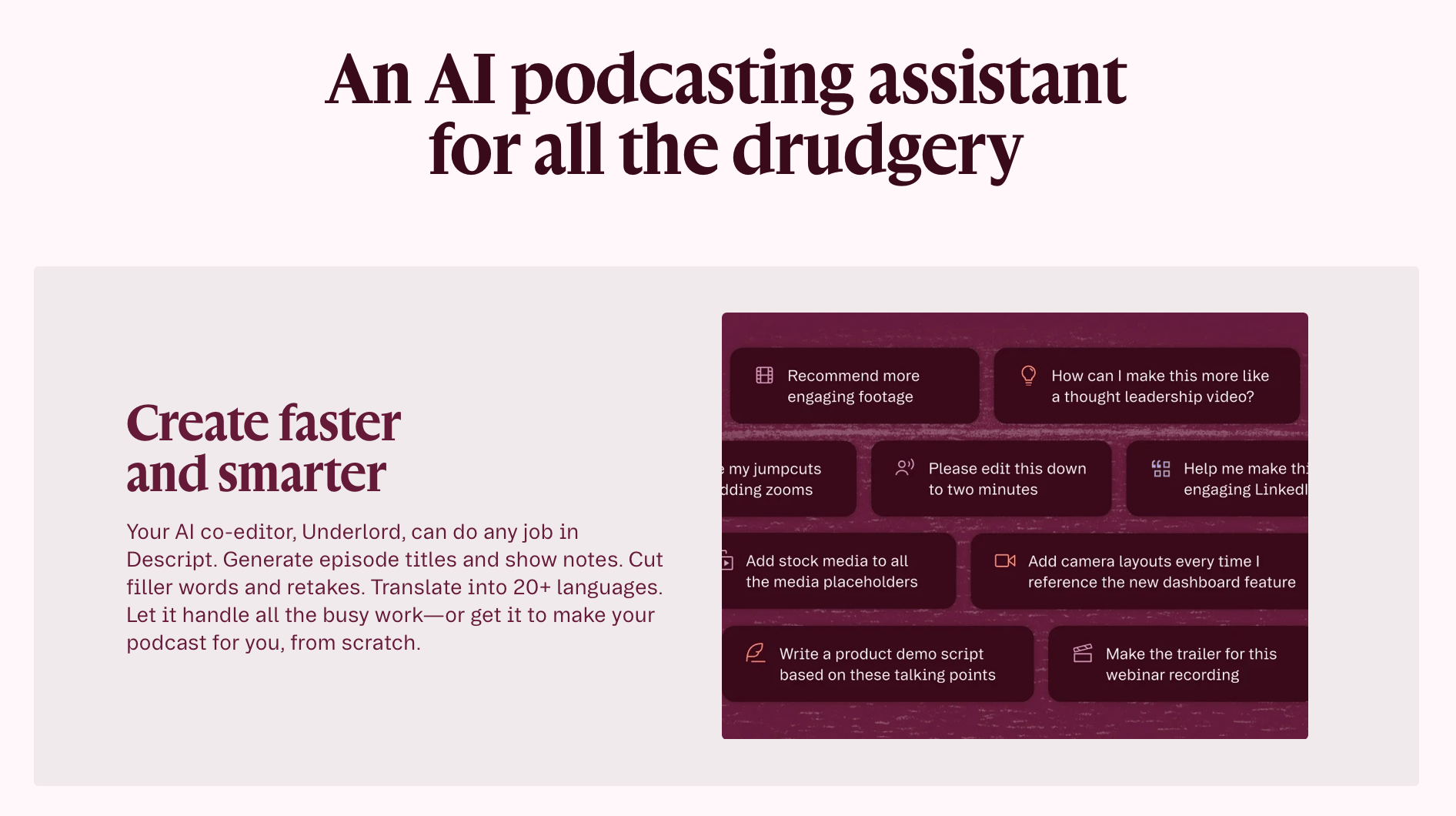
Descript eliminates the technical grunt work of podcasting by using AI to transcribe audio into text, allowing users to edit recordings by simply deleting or moving words in the transcript. Its robust feature set, combined with the simplicity of text-based editing, makes it one of the best podcast editing software options available; approachable enough to serve as beginner podcast editing software while still delivering professional-grade results. With packages ranging from $0 to $50+, it's also one of the more affordable AI podcast editing tools on the market.
Best Features Overview
Text-Based Editing: Deleting a sentence in the text automatically ripples the change into the audio file.
Studio Sound: A one-click AI enhancement tool that removes background noise and makes a bedroom recording sound like it was done in a professional studio.
Filler Word Removal: Automatically detects and removes "ums," "uhs," and "likes" with a single click.
Overdub: A feature that allows you to type new words to replace mistakes, using a synthesized version of your own voice.
Unlike Audacity or Adobe Audition, which require users to navigate complex multitrack timelines, Descript operates in a document-style environment. While traditional DAWs offer better "surgical" control over specific frequencies, Descript provides a significantly faster workflow for narrative-heavy podcasts.
Descript is perfect for content creators who find traditional audio timelines intimidating and those who want to produce episodes quickly through transcription.
Audacity
Audacity positions itself as a "Swiss Army Knife" for audio. It’s completely free, accessible on all operating systems, and capable of professional-grade multitrack editing.
Best Features Overview
Non-Destructive Editing: Recent updates have improved how Audacity handles real-time effects and clip manipulation.
Massive Plugin Library: Supports VST, AU, and Nyquist plugins to expand functionality.
Spectrogram View: Essential for visually identifying and removing specific noises like a cough or a phone notification.
Silence Truncation: Automatically identifies and shortens long gaps of silence in the recording.
Audacity lacks the polished interface of GarageBand or the AI automation of Descript. However, it offers deeper technical control for free than any paid competitor. Audacity is for those who want to learn the fundamentals of audio engineering without a financial commitment.
As a free podcast editing software, Audacity is perfect for beginners on a strict budget and those who want a "no-frills" offline editor that works on Windows, Mac, or Linux.
Riverside
Riverside markets itself as a "virtual studio" that records locally on each participant's computer to ensure high-quality audio regardless of internet connection stability. Pricing starts at $24 per month for Riverside, but there is a free version with limited features to test it in your workflow.
Best Features Overview
Local Recording: Records 48kHz WAV audio for every guest, avoiding the "robotic" sound of Zoom recordings.
Magic Clips: An AI tool that identifies the most engaging parts of your podcast and exports them as vertical videos for social media.
Text-Based Editor: Similar to Descript, Riverside now offers the ability to edit the recording via the transcript.
Separate Tracks: Automatically keeps the host and guest audio on different files, making it easier to balance volume levels later.
Unlike Descript, Riverside is built primarily for the recording phase. While its editing features are expanding, it is not yet as robust as a dedicated DAW. However, its ability to record 4K video alongside audio gives it a distinct advantage for "video podcasters" compared to Audacity or GarageBand.
Riverside is great for podcasters who conduct interviews over the internet and want to combine recording and basic editing into one workflow.
GarageBand
Apple designed GarageBand to be a "gateway" software. It provides the look and feel of their professional software, Logic Pro, but simplifies the interface for entry-level users. Plus, it's free on every Mac computer.
Best Features Overview
Pre-made Templates: Includes a specific "Podcast" template that pre-configures tracks for voices and music.
Smart Controls: Simplified knobs for adjusting "Brightness" or "Depth" rather than complex EQ frequencies.
Loop Library: Access to thousands of royalty-free jingles and sound effects to use as intros/outros.
Mobile Integration: You can start an edit on an iPad and finish it on a Mac seamlessly.
GarageBand is significantly more "musical" than Audacity. Its interface is cleaner and more modern, though it is limited strictly to Apple hardware. It also has a more intuitive "drag and drop" feel than most easy podcast editing tools on the market.
GarageBand is a great choice for Mac users who want a professional-looking interface and high-quality built-in sound effects without a subscription fee.
Podcast Editing Software Feature Comparison Table
| Feature | Descript | Audacity | Riverside.fm | GarageBand |
|---|---|---|---|---|
| Price | Freemium | Free | Freemium | Free (Mac) |
| Primary method | Text-based | Waveform | Browser-based | Waveform |
| AI features | High | Low | Medium | Low |
| Video editing | Yes | No | Yes | No |
| Offline usage | Yes | Yes | No | Yes |
Wrapping It Up: What Podcast Editing Software is The Best For Beginners?
The best podcast editing software balances cost against manual effort. While Descript offers AI speed for a monthly fee, free options like Audacity and GarageBand provide professional power for those willing to learn traditional waveforms. Our recommendation is to choose the software that best fits your hardware and minimizes technical friction.
-
The best option depends on your needs. Descript is ideal for total beginners thanks to its text-based editing, while Audacity is the top pick for those on a budget. Mac users get the most value from GarageBand, and podcasters who record remote interviews should consider Riverside.fm.
-
Yes, both Audacity and GarageBand are completely free. Audacity works on Windows, Mac, and Linux, making it the most accessible free option. GarageBand is free on all Mac computers and offers a more polished, professional-looking interface. Descript and Riverside.fm both offer free tiers but have paid plans for advanced features.
-
Not necessarily. Tools like Descript are specifically designed to remove the technical barrier; you edit your audio by editing a text transcript, with no waveforms involved. GarageBand also simplifies controls so beginners can adjust sound quality without understanding complex audio engineering. Audacity has a steeper learning curve, but it is a great choice if you want to gradually build those skills for free.

Red 11 Media is an educational platform and creative studio focused on driving growth online through strategic content creation. We help creators, brands, and businesses understand how to build sustainable audiences across YouTube, podcasting, and long-form digital content.