
Text-based editing is a workflow that lets creators edit audio and video by modifying a transcript instead of working with traditional timelines or waveforms. Delete words from the text, and the corresponding media is removed automatically. Rearrange sentences, and the audio follows. The approach significantly speeds up editing for dialogue-driven content like podcasts, interviews, and YouTube videos. Tools like Descript, Riverside, Adobe Premiere Pro, and CapCut all include some form of text-based editing.
Over 20 million videos are uploaded to YouTube every single day. Imagine how much total content goes into other podcasts, video, and audio platforms. For creators to keep up with that pace and cut through competitors' noise, there have to be more efficient ways to edit content.
The problem is that traditional editing workflows rely on clunky software or timeline-based features. It’s easy to waste an hour or two trying to scrub through audio or merge video clips. With AI video editing tools and text-based editing, creators can now use the transcript instead of a timeline, modifying text and letting the software handle the rest.
We’re all about finding new ways for content creators to improve their strategies. In this guide on text-based editing, you’ll get a better idea of how the process works and why it is growing in popularity with content creators from all niches.
Table of Contents
Starting with the Basics of Text-Based Editing
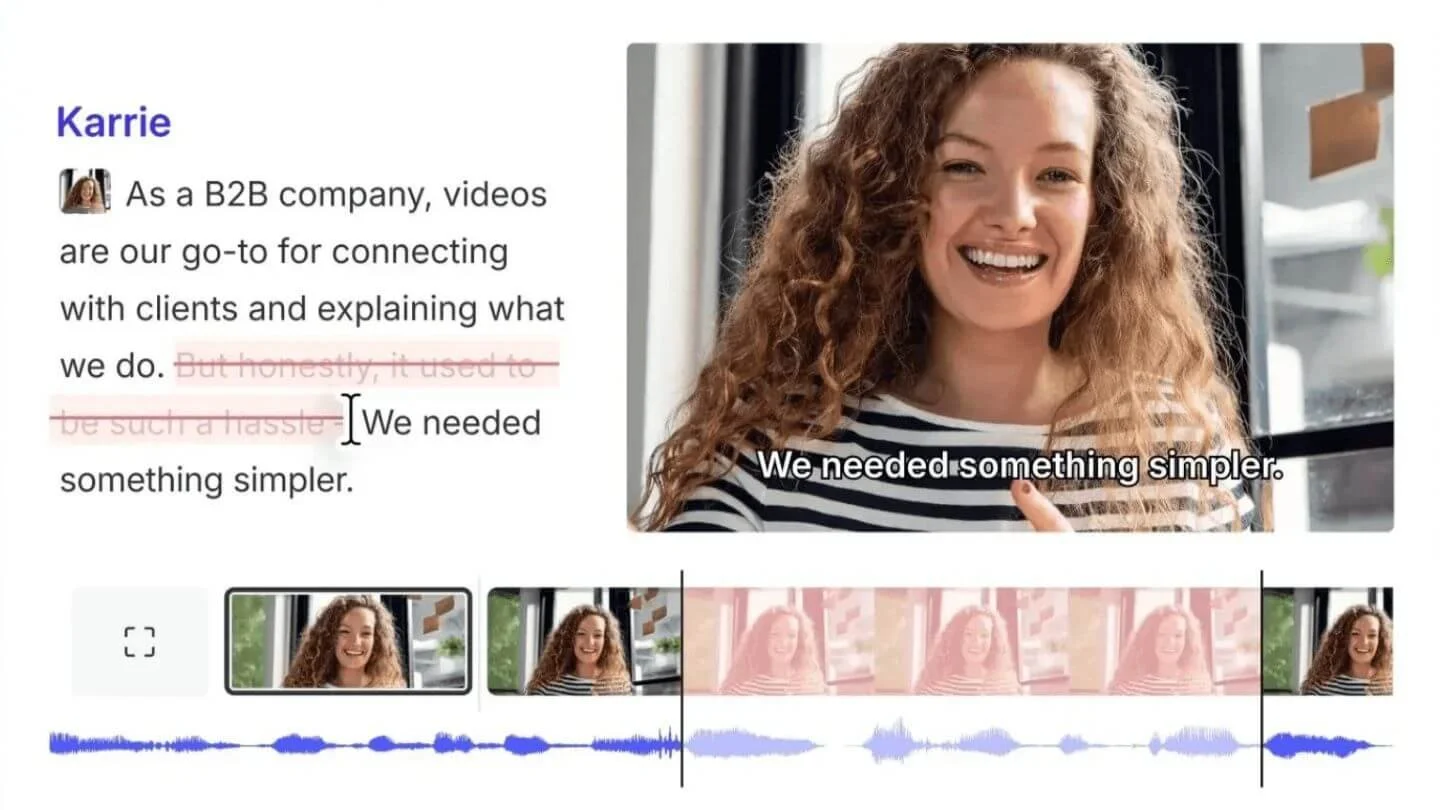
The whole idea behind text-based editing is to edit audio or video content by only modifying a transcript generated from the recording. This reduces the need to flip forward and back in a timeline-based system or working with waveforms and time marks.
You begin with a text transcription from audio files or recordings. That generated written transcript becomes your primary interface for editing. As you delete or rearrange text in the transcript, the software you’re using automatically edits the corresponding audio or video clips to mirror your actions.
Using transcript-to-text and then editing that text makes it much faster to trim a podcast episode or deliver an educational tutorial to your audience on a deadline. When you consider how long a podcast production takes, especially when removing filler words or locating mistakes, using text-based editing makes a lot of workflow sense.
How Text-Based Editing Works in Practice
It helps to see how video editing by text works in practice. This is a pretty new tool for many creators, so it can feel a little foreign at first, but once you adopt it, you’ll be surprised by how much time you save. The simple process includes:
Generate the Transcript: Convert the audio file or recorded speech in your video into a text transcript. Most platforms like YouTube, TikTok, or Instagram will do this for you, but there are plenty of AI-backed tools available online with strong synchronization that aligns each sentence with your media timelines.
Rough Cut Edit the Transcript: You start with a rough cut of the length and sequences of your content. You might remove filler words like “um,” “uh,” or repeated phrases. This is where you shorten long pauses or remove false starts. The software will edit your videos by removing the corresponding content.
Fine-Tune the Transcript: Text editing makes it much easier to rearrange sections. You can move sentences or paragraphs within the transcript instead of cutting and dragging clips. That helps you either emphasize a strong quote near the beginning as a hook or remove an off-topic section to use in a different piece of content. A transcript-to-text editing method organizes content around the narrative rather than the visuals.
Export Your Media: The final step is to export your finalized clips in the format required by your media platform.
Deciding whether to hire a video editor often comes down to time and resources. Yes, you get a lot of support and more time for content creation. But not every creator has a budget to bring in a team. Using a tool like text-based editing helps you get around those issues and still generate audience-ready media to grow your accounts.
Why Creators Are Adopting Text-Based Editing
The creator economy is predicted to grow from $127.65 billion to $528.39 billion by 2030. Content creation is a thriving industry, and more and more consumers are getting into it thanks to entry points like social media marketing and UGC (user-generated content). Having text-based editing as a way to produce more high-quality media supports this growth.
Faster Editing Workflows
The immediate benefit of using a transcript to edit video or audio is speed. Most creators can scan transcripts for mistakes or rearrange faster than manually scrubbing timelines. It’s a more efficient way to tighten up dialogue and storytelling, especially for long-form content like podcasts and interviews.
Easier Collaboration
One of the many reasons podcasts might fail is because of team collaboration. Everyone feels energized to launch a new project, but the time commitment and moving parts are too much. Text-based editing streamlines the workflow, as editors and producers can make comments directly on the text rather than referencing timestamps.
Improved Content Structuring
When you produce a video in a conversational tone or something with a storyline, you need structure. Text-based editors focus on the narrative. It gives you a way to examine the sections based on what is relevant to the story you want to tell, instead of pushing fluff that might lose audience engagement.
Accessibility and SEO Benefits
Another benefit is that you can use text transcription from audio to repurpose information and generate more accurate captions, subtitles, or create secondary content like blog posts that improve your visibility. Edited transcripts also help with SEO. You can quickly re-record sections that should include specific key phrases or elements, then edit them using the transcript instead of copying and pasting into a timeline.
Best Use Cases for Text-Based Editing
Text-based editing is best suited for longer-form content. It can be used for shorter clips of 30 seconds to 5 minutes, but it’s the longer media that really benefit. Podcast production is a great example. There's often conversational dialogue with pauses, mistakes, and filler you want to remove, but you don’t want to waste endless hours in front of your screen doing it.
YouTube talking head videos and interviews are another example of video editing by text, where rearranging responses improves clarity and narrative flow.
One of the ways we see text-based editing as a massive benefit is in repurposing long-form content. Creators can take a full podcast episode or web series and then use the transcripts to carve out shorter clips for social media or blog articles for SEO engagement. It even allows you to quickly extract quotes that are excellent for unique platforms like LinkedIn, Pinterest, and Instagram.
Limitations of Text-Based Editing Creators Should Understand
Using text-based editing does come with a slight caveat. Using this workflow is indeed much more efficient than traditional video editing, but there are some limitations that include:
Dialogue Light Content: If your content doesn’t have a lot of dialogue, then you cannot generate a transcript to edit. Anything visually complex might lose its appeal if there isn't any text for you to edit, so it doesn't appear in the transcript.
Transcription Accuracy: For text-based editing to work, you must have a clean, accurate way to transcribe your media. If there are errors, you could miss something you wanted to edit out.
Advanced Production: You may still want to use a timeline editor to complement text-based editing. That way, you can include production tasks like color grading or motion graphics in your final product.
Content creation is all about balance. There is a difference between DIY production and professional video, but if you blend text-based editing with other tools, you can push out premium content faster than before.
The Future of Editing Workflows for Creators
Content production tools are only going to evolve. The demand for faster, more accurate, and stable solutions to push out content is higher than ever. Text-based editing demonstrates how these new tools are reshaping the editing process, giving creators everywhere a faster, more intuitive way to produce polished media.
If you use a dialogue-driven format such as interviews, educational content, or podcasts, text-based editing is a practical way to improve your workflows.
-
Text-based editing lets you edit the audio and video by editing the transcript. Delete a word from the text, and it is removed from the timeline. Rearrange sentences, and the audio follows.
-
Speed and easier editing navigation. Timelines can be overwhelming to some producers or creators, and text-based systems make it easier to make changes and collaborate with others.
-
-
No, and this is important. You don’t want to mistake editing captions for editing the transcript. The software you use will more than likely rely on the transcript only, not the auto-generated captions.

Red 11 Media is an educational platform and creative studio focused on driving growth online through strategic content creation. We help creators, brands, and businesses understand how to build sustainable audiences across YouTube, podcasting, and long-form digital content.