
Riverside vs Descript: Recording vs Editing Workflows
Riverside and Descript aren't direct competitors. They solve different problems in podcast production. Riverside excels at remote recording with local capture, separate tracks per participant, 4K video, and reliable progressive uploads. Descript leads in editing through text-based workflows, AI-powered filler word removal, voice cloning, and Magic Clips for social media. Both offer free plans and similar mid-tier pricing around $16-$24 monthly. Many professional podcasters use Riverside to record and Descript to edit for the strongest production stack.
Riverside vs Descript is one of the most common comparisons podcasters make when they decide to get serious about their audio and video quality.
Both platforms have built strong reputations in the content creation space, and both are genuinely excellent at what they do. The confusion comes from the fact that they do not do the same thing.
Riverside is primarily focused on recording. Descript is primarily focused on editing. Understanding that distinction from the beginning will save you from choosing the wrong tool for your biggest problem, or worse, paying for two platforms when you only need one.
This comparison breaks down exactly how Riverside and Descript differ, where each one excels, and which workflows each platform is genuinely built for.
Table of Contents
The Core Difference Between Riverside and Descript
When you put Riverside vs Descript side by side on a feature list, the overlap looks significant.
Both record audio and video. Both handle remote interviews. Both use AI tools to assist with content creation. But the overlap is largely superficial.
The two platforms were built from completely different starting points, and those foundations still define what each one does best.
Riverside launched as a remote recording platform. Everything about how it works, from local recording on each participant's device to progressive uploads and studio-quality audio capture, was designed to solve one problem: getting the highest quality recording possible when your guest is not in the same room.
Descript launched as a transcription and audio editing tool. Its core innovation was text-based editing, the idea that you should be able to edit audio and video the way you edit a Google Docs document. It has expanded into recording over time, but editing remains the heart of what makes Descript vs Riverside such a different experience in practice.
For most podcasters, Riverside and Descript are not competing for the same job. They are complementary tools that cover different stages of the production process.
Riverside: Built for Recording
Riverside is the strongest remote recording platform available for podcasters who need crystal-clear audio and high-quality video from guests on shaky internet connections. Its approach to recording is fundamentally different from general video call tools, and that difference shows up immediately in the files you get at the end of a session.
Local Recording on Every Device
Rather than streaming audio and video through its servers in real time, Riverside records directly onto each participant's own device. The audio and video files are captured locally at full quality, then uploaded automatically to the cloud once the session ends.
This means the recording quality is not affected by a guest's internet connection. Even if their broadband drops mid-session, the local recording continues and syncs once they reconnect.
This local recording approach produces multitrack audio that is significantly cleaner than anything a cloud-streamed platform can deliver. Each participant's audio is saved as a separate audio file, which gives you separate tracks to work with in editing. The difference in audio quality between a Riverside recording and a Zoom recording of the same conversation is not subtle.
High Quality Video and Separate Tracks
Riverside captures high-quality video at up to 4K from webcam recording or connected cameras, with separate video tracks per participant. This is a game-changer for video content creators who need the flexibility to cut between speakers in editing without sacrificing quality. The separate audio and video tracks give editors a level of control that mixed recordings simply cannot match.
Riverside also supports live streaming to multiple platforms simultaneously, producer mode for managing sessions behind the scenes, and smart mute to prevent background noise from being picked up when participants are not speaking. For teams running more produced shows or live call-ins, these standout features add significant production value without requiring a professional studio setup.
Where Riverside Falls Short
Riverside is not an editing platform.
Its built-in editing tools are basic and suitable for simple cuts and clip creation, but if you want to edit video, fix mistakes, remove filler words at scale, or produce a polished final episode within the same tool you used to record, Riverside will send you elsewhere. For podcasters who want a single platform to cover recording hours through to a finished episode, that is a meaningful limitation.
Descript: Built for Editing
Descript wins on editing, and it is not particularly close. Its text-based editing approach changed how many podcasters and video creators think about the editing process, and the platform has continued to build on that foundation with AI features that make fast editing genuinely accessible to people with no prior audio or video editing experience.
Text-Based Editing: A Game Changer for Podcasters
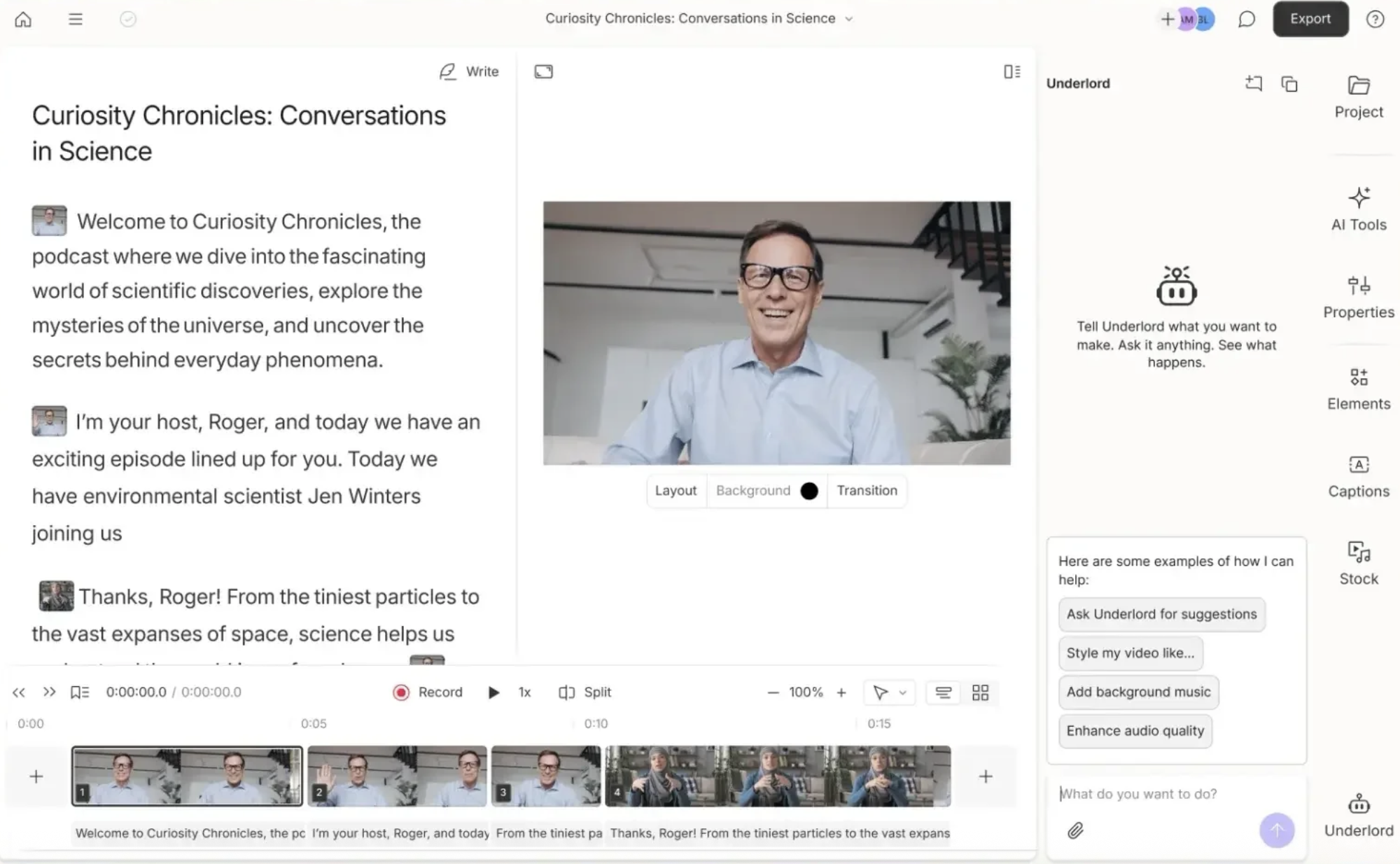
Descript transcribes every recording automatically and lets you edit the audio and video by editing the transcript. Delete a word from the text, and it is removed from the timeline. Rearrange sentences, and the audio follows.
For podcast editing, this approach is transformative. It removes the need to scrub through a waveform looking for the right moment and replaces it with something that feels closer to editing a document.
Filler word removal is one of the most popular features Descript offers. It identifies every instance of filler words across all speakers in a recording and lets you remove them in bulk across the whole episode. In a forty-five-minute conversation with two guests, automated filler words removal can save thirty minutes of manual editing work and produce a noticeably tighter result.
Audio Cleanup and AI Voiceovers
Descript's audio enhancement tools include noise reduction, audio cleanup for removing background noise, and its Overdub feature, which allows re-recording of individual words and phrases using a synthetic version of your own voice.
Rather than re-recording an entire section because of a stumbled word or a door slamming in the background, you can fix mistakes at the word level without anyone hearing the join. Voice cloning is one of the most genuinely useful AI features in any editing platform currently available.
Descript also generates shareable clips and social media clips from long-form content using its Magic Clips feature. Rather than watching an entire episode back to find the best moments, Magic Clips surfaces the most engaging clips automatically and formats them for multiple platforms.
For solo creators managing content creation across channels without a dedicated editor, this is a significant time-saver.
Where Descript Falls Short
Descript's recording quality, while solid, does not match Riverside for remote interviews with multiple participants on different connections. It records audio and video on each participant's device, but the recording experience is less polished than Riverside's, and features like producer mode, live streaming, and live call-ins are not available.
For podcasters who do a lot of remote interviews with guests who are not technically confident, Riverside's simpler guest experience and more robust recording infrastructure make it the safer choice for the capture stage.
Descript also has a learning curve. Text-based editing is intuitive once it clicks, but the overall interface has more depth than Riverside, and some users find the editing platform takes a few sessions to navigate confidently. The steep learning curve is worth pushing through, given what it unlocks, but it is worth setting realistic expectations if your team is new to the tool.
Key Features Comparison
Here is how Riverside and Descript compare across the features that matter most to podcasters and video creators.
Recording Quality
Riverside wins on recording quality for remote interviews. Its local recording approach, separate audio tracks per participant, and studio-quality audio output are the best available in a browser-based remote recording platform.
Descript records well, but Riverside's infrastructure is more robust for multi-participant sessions on varying internet connections. For high-quality recording of remote guests, Riverside is the stronger choice.
Editing
Descript wins on editing, decisively. Text-based editing, filler word removal, audio cleanup, voice cloning, Magic Clips, and the ability to edit video with the same ease as editing a document make Descript the most accessible and efficient editing platform available for podcasters.
Riverside's editing tools are functional for basic cuts but are not designed to compete with Descript at this stage of the workflow.
Live Streaming
Riverside supports live streaming to multiple platforms simultaneously and includes producer mode for managing live sessions.
Descript does not offer live streaming as a core feature. If your podcast format includes a live audience component or regular live call-ins, Riverside is the only option of the two that supports this.
Social Media Clips
Both Riverside and Descript generate social media clips from recordings.
Riverside's clip tool is straightforward and produces engaging clips quickly.
Descript's Magic Clips feature uses AI to identify the most shareable moments and creates multiple formatted clips automatically, which gives it a meaningful edge for content creation teams managing distribution across multiple platforms.
Podcast Hosting
Neither Riverside nor Descript is primarily a podcast hosting platform, but Descript integrates with major hosting services and allows you to publish directly from the editing interface.
Riverside does not offer the same level of distribution integration. If streamlining your publish workflow is a priority, Descript's closer connection to the distribution stage gives it a practical advantage.
AI Tools: How Riverside and Descript Compare
Both Riverside and Descript have invested heavily in AI features, and both have an AI assistant to help with content creation tasks. In practice, their AI tools serve different parts of the workflow.
Riverside's AI features are primarily focused on the recording and clip creation stage. Its AI co-pilot helps with session management, clip generation, and basic audio enhancement. The AI-powered features in Riverside are useful but relatively contained compared to what Descript offers.
Descript's AI tools, grouped under the Underlord branding, cover a much wider range of tasks: Automatic transcription, filler words removal, background noise removal, voice cloning for re-recording, Magic Clips for social media content, noise reduction, show notes generation, and an AI assistant that can answer questions about the project and suggest edits.
For the editing process and post-production workflow, Descript's AI features are significantly more developed and practically useful.
The voice cloning feature in Descript deserves a specific mention because it is genuinely unlike anything Riverside offers.
The ability to correct your own voice, fix mistakes in a recording, and re-record individual words using a synthetic version of your own voice without anyone hearing the join is one of the most impressive and practically useful AI features in any creative tool currently available.
Pricing and Free Plans
Both Riverside and Descript offer a free plan that gives you enough access to test the platform properly before committing to a paid subscription.
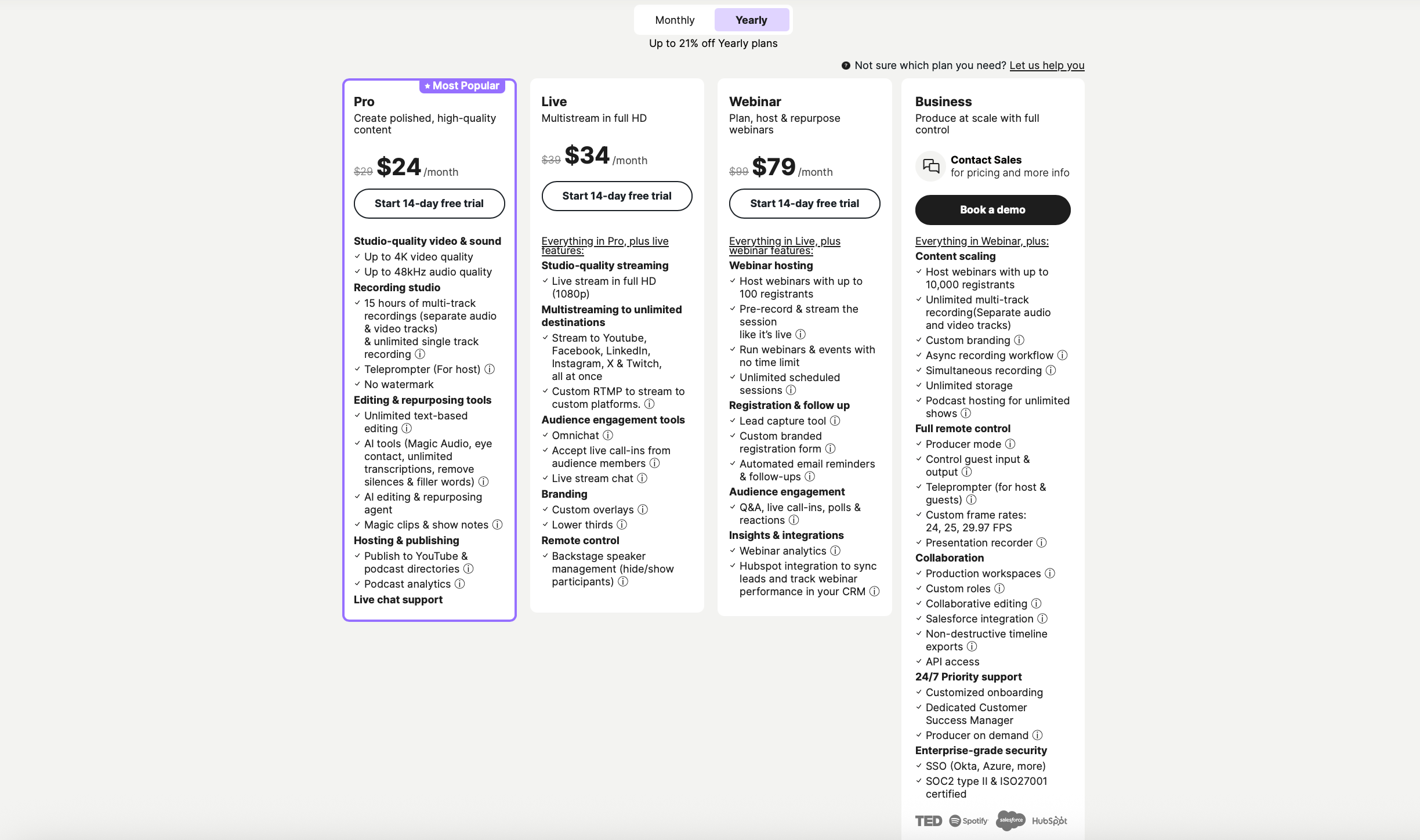
Riverside's free plan includes limited recording hours and basic features. Paid plans start at around $24 per month and unlock unlimited recording, separate tracks, 4K video, and advanced tools, including producer mode and live streaming. The free plan is useful for testing the recording experience, but it restricts transcription hours and some of the more advanced recording features.
Descript's free plan includes basic recording, a limited number of transcription hours, and access to text-based editing. Paid plans start at around $16 per month and expand transcription hours, remove export restrictions, and unlock the full suite of AI tools, including Magic Clips, voice cloning, and advanced audio cleanup. For the features on offer, Descript's paid plans represent strong value at the entry level.
At comparable mid-tier pricing, Riverside and Descript cost roughly the same. The decision is not about price. It is about which stage of the workflow you need the most help with.
Who Should Use Riverside?
Riverside is the right choice if your primary concern is capturing the highest quality recording possible from remote guests.
It is the better platform if you regularly interview guests with varying technical setups or shaky internet connections, produce a live show with a live audience, need studio sound from a browser-based tool without a professional studio, want separate audio and video tracks per participant for maximum editing flexibility, or need producer mode and live streaming as part of your regular workflow.
Riverside is also worth considering for solo creators who are comfortable handling editing in a separate tool and primarily want a recording platform they can trust to capture high-quality audio and video without thinking about it.
Who Should Use Descript?
Descript is the right choice if editing is where you spend the most time and lose the most momentum in your podcast production process.
It is the stronger platform if you want text-based editing that makes the editing process accessible to anyone on your team, need filler word removal and audio cleanup to happen quickly and at scale, want to generate social media clips and show notes from inside the same project, are creating long form content that requires significant cutting and restructuring, or want voice cloning to fix mistakes without re-recording entire sections.
Descript is also a strong choice for solo creators who want a user-friendly interface that handles both recording and editing without the need for a separate tool, and who are willing to spend a session or two working through the learning curve to get there.
Can You Use Both?
Yes, and many professional podcasters do. Using Riverside to record and Descript to edit is one of the most effective podcast production workflows available. You get the best recording quality from Riverside and the best editing experience from Descript, with each platform doing the job it was built for.
The workflow is straightforward. Record your episode in Riverside, download the separate audio tracks, import them into Descript, and edit using the transcript.
Descript handles the same project from import through to export, and both audio and video files are managed within the editing platform. The two tools work together without friction, and the combined result is studio-quality from capture to finished episode.
For teams with a budget that supports two subscriptions, Riverside and Descript together represent the strongest possible podcast production stack for remote interview-based shows.
Grow Faster. Create Smarter.
Red 11 Media is an educational platform and creative studio focused on driving growth online through strategic content creation. We help creators, brands, and businesses understand how to build sustainable audiences across YouTube, podcasting, and long-form digital content.
Final Verdict
The Riverside vs Descript debate is not really a debate. They are not competing for the same job.
If your biggest problem is capturing studio sound from remote guests reliably, use Riverside. If your biggest problem is spending too long editing and not having the tools to do it efficiently, use Descript.
If you want the best of both, use Riverside to record and Descript to edit, and you will have a production workflow that most professional podcast teams would be happy with.
Both platforms offer a free plan. Try them both, identify where your workflow breaks down most often, and invest in the tool that fixes that specific problem first.
Everything else is refinement.
Frequently Asked Questions
-
Riverside is primarily a recording platform and Descript is primarily an editing platform. Riverside focuses on capturing the highest quality audio and video possible from remote guests using local recording on each participant's device. Descript focuses on making the editing process faster and more accessible through text based editing, filler word removal, voice cloning, and AI powered tools. Understanding that distinction makes choosing between them significantly easier.
-
Riverside is the stronger recording platform. Its local recording approach, separate audio tracks per participant, studio quality audio output, and robust infrastructure for handling shaky internet connections make it the most reliable option for remote podcast recording. Descript records well but was not built with recording as its primary focus, and for multi-participant remote interviews in particular, Riverside delivers consistently better results.
-
Descript wins on editing. Its text based editing approach lets you edit audio and video by editing a transcript, which makes the process dramatically faster and more accessible than traditional timeline editing. Features like bulk filler word removal, voice cloning for re recording mistakes, Magic Clips for social media content, and automatic show notes generation give Descript a significant edge over Riverside at the editing stage of the workflow.
-
Yes, and many professional podcasters do exactly this. The most effective workflow is to record in Riverside, download the separate audio tracks, and import them into Descript for editing. You get the best recording quality from Riverside and the best editing experience from Descript, with each platform doing the job it was built for. Both tools work together without friction and the combined result covers the full production workflow from capture to finished episode.
-
Yes. Riverside offers a free plan with limited recording hours and basic features, which is enough to test the recording experience and guest workflow before committing to a paid subscription. Descript also offers a free plan with basic recording, limited transcription hours, and access to text based editing. Both free plans give you enough access to evaluate whether the platform suits your needs, and paid plans for both start at a similar monthly price point.
-
No. Live streaming is not a core feature in Descript. If your podcast format includes broadcasting to a live audience or live call ins, Riverside is the better choice. It supports live streaming to multiple platforms simultaneously and includes producer mode for managing live sessions behind the scenes. For recorded podcasts that are edited and published after recording, the absence of live streaming in Descript is not a limitation.

Red 11 Media is an educational platform and creative studio focused on driving growth online through strategic content creation. We help creators, brands, and businesses understand how to build sustainable audiences across YouTube, podcasting, and long-form digital content.
