
Canon EOS R50 recording time and file size
How much fits on each card, for all 12 recording modes Canon publishes. Bitrates checked November 11, 2026.
Ask about the Canon EOS R50
Key facts
- Recording media
- SD (UHS-I), single slot
- Published recording modes
- 12 normal, plus 8 slow motion
- Highest bitrate
- 170 Mbps: MP4 H.265/HEVC 4:2:2 10-bit IPB (Standard) at 29.97p / 25p / 23.98p (4:2:2 10-bit)
- Lightest 4K mode
- 60 Mbps: MP4 H.264/MPEG-4 AVC 4:2:0 8-bit IPB (Light) at 29.97p / 25p / 23.98p (4:2:0 8-bit)
- Card for the top mode
- V30
- 128 GB card at 4K 30p
- 1 hr 35 min in MP4 H.265/HEVC 4:2:2 10-bit IPB (Standard) at 29.97p (4:2:2 10-bit, 170 Mbps)
- Top frame rate (normal video)
- 59.94p at 1080p
- Slow motion (in camera)
- Yes. Up to 120 fps at 1080p
Canon EOS R50
"4K 30p" means the highest-bitrate 4K UHD mode at 29.97p or 30p that a V30 card can record (240 Mbps or less). If there is no 30p, we use 25p, then 24p.
Quick answer
A 128 GB card holds about 1 hr 35 min of MP4 H.265/HEVC 4:2:2 10-bit IPB (Standard) at 29.97p (4:2:2 10-bit, 170 Mbps) on the Canon EOS R50. The heaviest mode, MP4 H.265/HEVC 4:2:2 10-bit IPB (Standard) at 29.97p / 25p / 23.98p (4:2:2 10-bit, 170 Mbps), uses 76.5 GB per hour, so the same card lasts 1 hr 35 min. The lightest 4K mode (60 Mbps) fits 4 hr 30 min.
Open the Canon EOS R50 in the calculatorSet your shoot length, number of cameras and upload speed to see total storage and cards needed.
Recording time by mode
Every normal recording mode Canon lists, grouped by resolution and frame rate. Times are continuous recording on one card.
| Format | Color | BitrateMbps | Per hourGB | 64 GBcard | 128 GBcard | 256 GBcard | 512 GBcard | Card speed |
|---|---|---|---|---|---|---|---|---|
| 4K 3840x2160 | ||||||||
| 23.98p | ||||||||
| MP4 H.265/HEVC 4:2:2 10-bit IPB (Standard) | 4:2:2 10-bit | 170 | 76.5 | 47m | 1h 35m | 3h 10m | 6h 21m | V30 |
| MP4 H.264/MPEG-4 AVC 4:2:0 8-bit IPB (Standard) | 4:2:0 8-bit | 120 | 54 | 1h 7m | 2h 15m | 4h 30m | 9h | V30 |
| MP4 H.265/HEVC 4:2:2 10-bit IPB (Light) | 4:2:2 10-bit | 85 | 38.3 | 1h 35m | 3h 10m | 6h 21m | 12h | V30 |
| MP4 H.264/MPEG-4 AVC 4:2:0 8-bit IPB (Light) | 4:2:0 8-bit | 60 | 27 | 2h 15m | 4h 30m | 9h | 18h | V30 |
| 29.97p / 25p | ||||||||
| MP4 H.265/HEVC 4:2:2 10-bit IPB (Standard)4K 30p pick | 4:2:2 10-bit | 170 | 76.5 | 47m | 1h 35m | 3h 10m | 6h 21m | V30 |
| MP4 H.264/MPEG-4 AVC 4:2:0 8-bit IPB (Standard) | 4:2:0 8-bit | 120 | 54 | 1h 7m | 2h 15m | 4h 30m | 9h | V30 |
| MP4 H.265/HEVC 4:2:2 10-bit IPB (Light) | 4:2:2 10-bit | 85 | 38.3 | 1h 35m | 3h 10m | 6h 21m | 12h | V30 |
| MP4 H.264/MPEG-4 AVC 4:2:0 8-bit IPB (Light) | 4:2:0 8-bit | 60 | 27 | 2h 15m | 4h 30m | 9h | 18h | V30 |
| 1080p 1920x1080 | ||||||||
| 23.98p | ||||||||
| MP4 H.265/HEVC 4:2:2 10-bit IPB (Standard) | 4:2:2 10-bit | 45 | 20.3 | 3h | 6h | 12h | 24h | V30 |
| MP4 H.264/MPEG-4 AVC 4:2:0 8-bit IPB (Standard) | 4:2:0 8-bit | 30 | 13.5 | 4h 30m | 9h | 18h | 36h | V30 |
| MP4 H.265/HEVC 4:2:2 10-bit IPB (Light) | 4:2:2 10-bit | 28 | 12.6 | 4h 49m | 9h 39m | 19h | 38h | V30 |
| MP4 H.264/MPEG-4 AVC 4:2:0 8-bit IPB (Light) | 4:2:0 8-bit | 12 | 5.4 | 11h | 22h | 45h | 90h | V30 |
| 29.97p / 25p | ||||||||
| MP4 H.265/HEVC 4:2:2 10-bit IPB (Standard) | 4:2:2 10-bit | 45 | 20.3 | 3h | 6h | 12h | 24h | V30 |
| MP4 H.264/MPEG-4 AVC 4:2:0 8-bit IPB (Standard) | 4:2:0 8-bit | 30 | 13.5 | 4h 30m | 9h | 18h | 36h | V30 |
| MP4 H.265/HEVC 4:2:2 10-bit IPB (Light) | 4:2:2 10-bit | 28 | 12.6 | 4h 49m | 9h 39m | 19h | 38h | V30 |
| MP4 H.264/MPEG-4 AVC 4:2:0 8-bit IPB (Light) | 4:2:0 8-bit | 12 | 5.4 | 11h | 22h | 45h | 90h | V30 |
| 59.94p / 50p | ||||||||
| MP4 H.265/HEVC 4:2:2 10-bit IPB (Standard) | 4:2:2 10-bit | 90 | 40.5 | 1h 30m | 3h | 6h | 12h | V30 |
| MP4 H.264/MPEG-4 AVC 4:2:0 8-bit IPB (Standard) | 4:2:0 8-bit | 60 | 27 | 2h 15m | 4h 30m | 9h | 18h | V30 |
| MP4 H.265/HEVC 4:2:2 10-bit IPB (Light) | 4:2:2 10-bit | 50 | 22.5 | 2h 42m | 5h 24m | 10h | 21h | V30 |
| MP4 H.264/MPEG-4 AVC 4:2:0 8-bit IPB (Light) | 4:2:0 8-bit | 35 | 15.8 | 3h 51m | 7h 43m | 15h | 30h | V30 |
GB per hour = bitrate in Mbps x 0.45. Card times use 95% of the labelled size (formatting and file overhead). Card speed: V30 up to 240 Mbps, V60 up to 480, V90 up to 720, CFexpress above that. * Canon's stated minimum for that format, which is stricter than the bitrate alone needs. Scroll the table sideways on a phone.
Memory cards
- Card types
- SD (UHS-I), single slot
- Canon's card requirements
- Not published by Canon
Canon's card requirements
Recommended cards for the Canon EOS R50
Canon's own or recommended cards first, then the most-reviewed cards on B&H for this camera's media. SD cards show how many of this camera's modes they can record; for other cards, compare the speed with the requirements above.
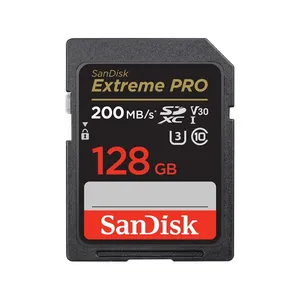
- SD, V30SanDisk 128GB Extreme PRO UHS-I SDXCHandles: Every normal recording mode (12)
We earn a commission if you buy through these store links, at no extra cost to you. It doesn't change which cards we list.
Slow motion
In slow motion the camera writes data faster than the file's bitrate, because each second you shoot plays back as several seconds. These figures are per minute of shooting, not of finished video.
| Resolution | Shooting | Plays at | Data writtenMbps | Per hour shotGB | 128 GB cardshooting time |
|---|---|---|---|---|---|
| 1080p 1920x1080 | 120 / 100 fps | 29.97p, 25p | 70 to 180 | 31.5 to 81 | 1h 30m to 3h 51m |
All 8 slow-motion settings
| Format | Resolution | Color | Shooting | Plays at | FileMbps | Data writtenMbps | Per hour shotGB | 128 GB card | Card speed |
|---|---|---|---|---|---|---|---|---|---|
| MP4 H.265/HEVC IPB (Standard) | 1080p 1920x1080 | 4:2:2 10-bit | 120 fps | 29.97p (4x slower) | 180 | 180 | 81 | 1h 30m | V30 |
| MP4 H.264/MPEG-4 AVC IPB (Standard) | 1080p 1920x1080 | 4:2:0 8-bit | 120 fps | 29.97p (4x slower) | 120 | 120 | 54 | 2h 15m | V30 |
| MP4 H.265/HEVC IPB (Light) | 1080p 1920x1080 | 4:2:2 10-bit | 120 fps | 29.97p (4x slower) | 100 | 100 | 45 | 2h 42m | V30 |
| MP4 H.264/MPEG-4 AVC IPB (Light) | 1080p 1920x1080 | 4:2:0 8-bit | 120 fps | 29.97p (4x slower) | 70 | 70 | 31.5 | 3h 51m | V30 |
| MP4 H.265/HEVC IPB (Standard) | 1080p 1920x1080 | 4:2:2 10-bit | 100 fps | 25p (4x slower) | 180 | 180 | 81 | 1h 30m | V30 |
| MP4 H.264/MPEG-4 AVC IPB (Standard) | 1080p 1920x1080 | 4:2:0 8-bit | 100 fps | 25p (4x slower) | 120 | 120 | 54 | 2h 15m | V30 |
| MP4 H.265/HEVC IPB (Light) | 1080p 1920x1080 | 4:2:2 10-bit | 100 fps | 25p (4x slower) | 100 | 100 | 45 | 2h 42m | V30 |
| MP4 H.264/MPEG-4 AVC IPB (Light) | 1080p 1920x1080 | 4:2:0 8-bit | 100 fps | 25p (4x slower) | 70 | 70 | 31.5 | 3h 51m | V30 |
Questions
How long does a 128 GB card last in the Canon EOS R50?
From 1 hr 35 min in its heaviest mode to 22 hr in its lightest. In MP4 H.265/HEVC 4:2:2 10-bit IPB (Standard) at 29.97p (4:2:2 10-bit, 170 Mbps) it holds about 1 hr 35 min. Times use Canon's published bitrates and 95% of the card's labelled size.
What memory card does the Canon EOS R50 need?
It records to SD (UHS-I), single slot. For its top mode (170 Mbps) you need a V30 card or faster. Lighter modes work with slower cards; the table on this page lists the card speed for every mode.
How much storage does an hour of 4K take on the Canon EOS R50?
Between 27 GB and 76.5 GB per hour, depending on the format and bitrate. MP4 H.265/HEVC 4:2:2 10-bit IPB (Standard) at 29.97p (4:2:2 10-bit, 170 Mbps) uses 76.5 GB per hour.
Can the Canon EOS R50 record slow motion in camera?
Yes. Canon lists 8 slow-motion settings, up to 120 fps at 1080p. Slow motion writes more data per minute of shooting than the file's bitrate suggests, because each second you shoot becomes several seconds of video.
Sources
- Bitrates and card requirements
- cam.start.canon/en/C011/manual/html/UG-11_Reference_0090.html
downloads.canon.com/ow/camera/EOS-R50-Spec-Sheet.pdf - Checked
- November 11, 2026
- How we calculate
- GB per hour = Mbps x 0.45. Card time = 95% of the card size / GB per hour. Real files can differ by a few percent (audio track, file overhead, card format).
Spotted a wrong number? Tell us and we'll check it against Canon's documents.